Changing a date, adding a keyword, and clicking Update aren't what produce the most results. Yet that’s what many content refresh checklists consist of. They just keep the teams busy without solving a real problem. Pages get updated because they’re old, because someone spotted a keyword opportunity, or simply because there’s a target to hit.
When AI visibility drops, 42% of marketing teams respond by producing more content at scale. Only 23% say their primary approach is improving and optimizing the content they already have so AI systems can better understand and cite it.
The thing is, publishing more pages won’t fix a retrievability problem. Better pages will.
A useful content update starts with a specific problem: a 40% drop in impressions for a commercially important query, for example, or a competitor showing up in AI answers where your brand used to be cited. You update the page to address that problem, validate the changes, measure what happens in both Google and AI-generated answers, and use the results to decide what to update next.
Two data sources should inform which pages make the shortlist:
Search Console tells you where clicks and impressions are declining. It can't tell you whether your page is being cited in ChatGPT, Perplexity, or Google AI Mode when someone asks a question it's supposed to answer. A page can look stable in Search Console while a competitor is quietly taking its place in AI-generated answers for the same topic.
For AI visibility, we like to use Scrunch to find what Search Console can’t. Scrunch's Site Optimization runs a page-by-page analysis of your site and surfaces the AI visibility layer your traditional search data won't show, like which pages are losing citations, which competitors are appearing in their place, and which fixes will move the needle most.
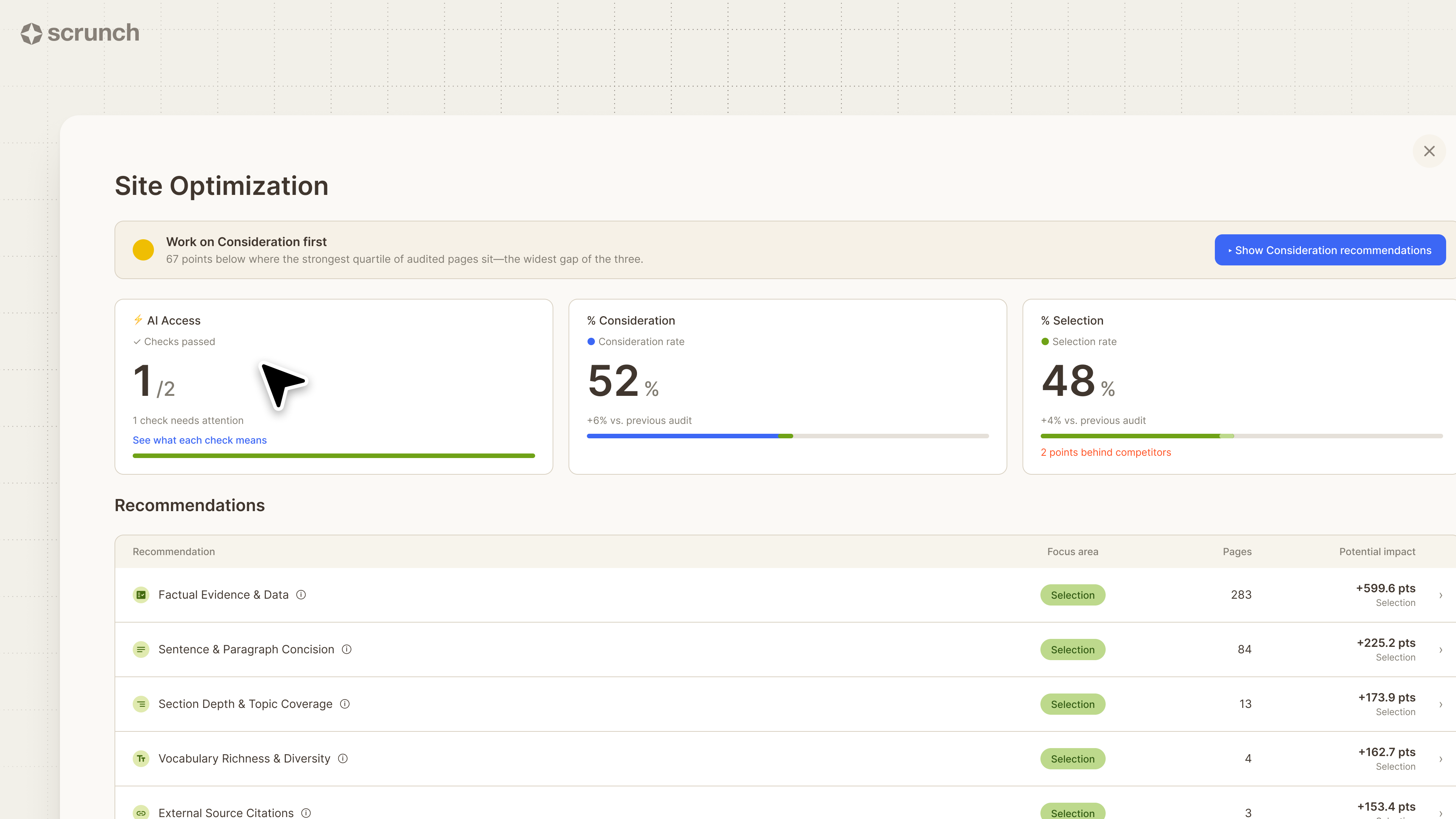
The end result is a prioritized list of issues ranked by impact, mapped to specific URLs, and summarized in detail. You can dive into any page at any time to see where things stand, review recommendations, and kick off the content optimization process.
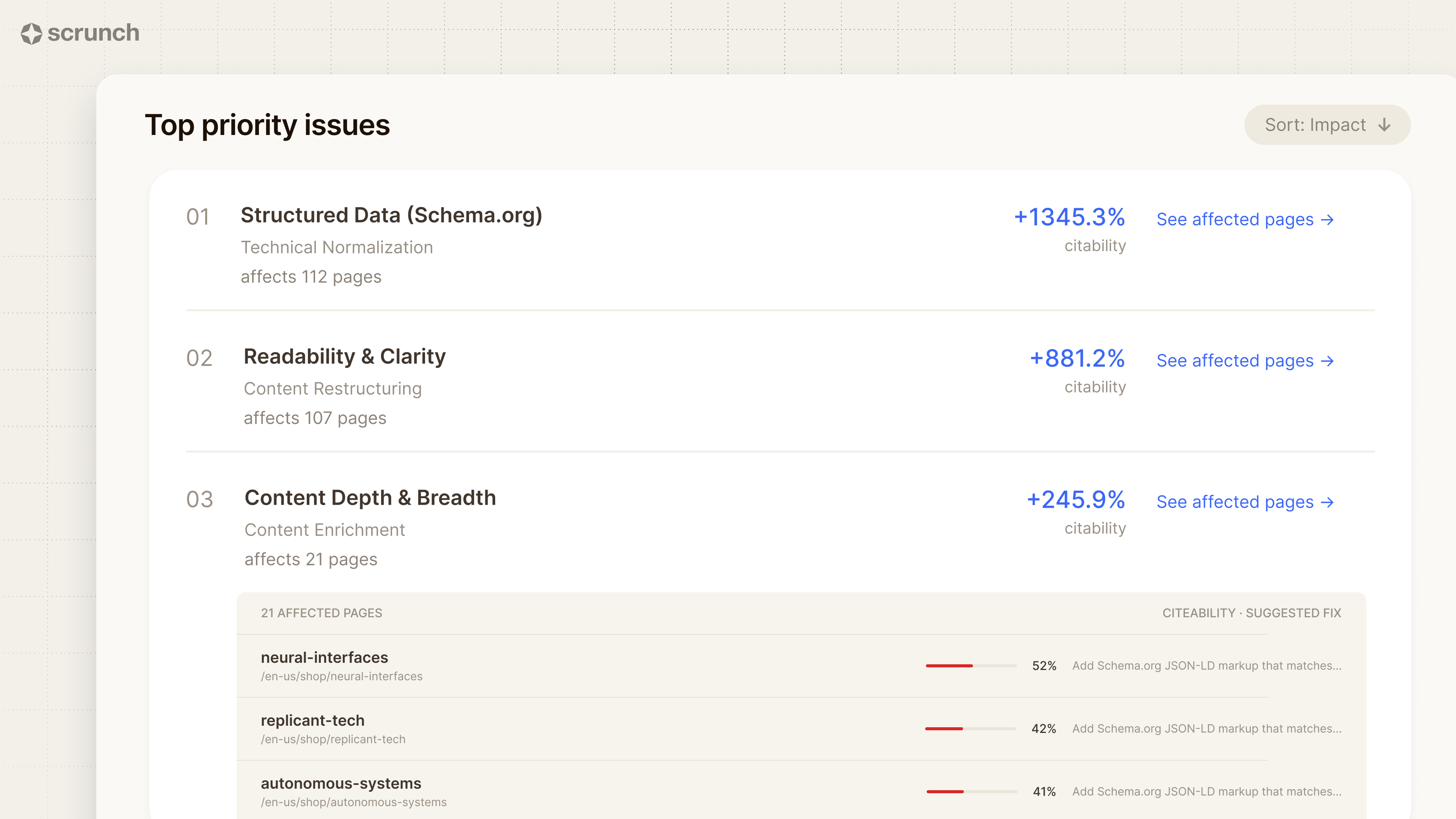
For traditional search, start with recurring signals in Google Search Console. Go to Performance > Search results, enable clicks, impressions, average CTR, and average position, then open the Pages tab. Compare the last three months with the same three-month period a year earlier to spot pages with meaningful gains or declines.
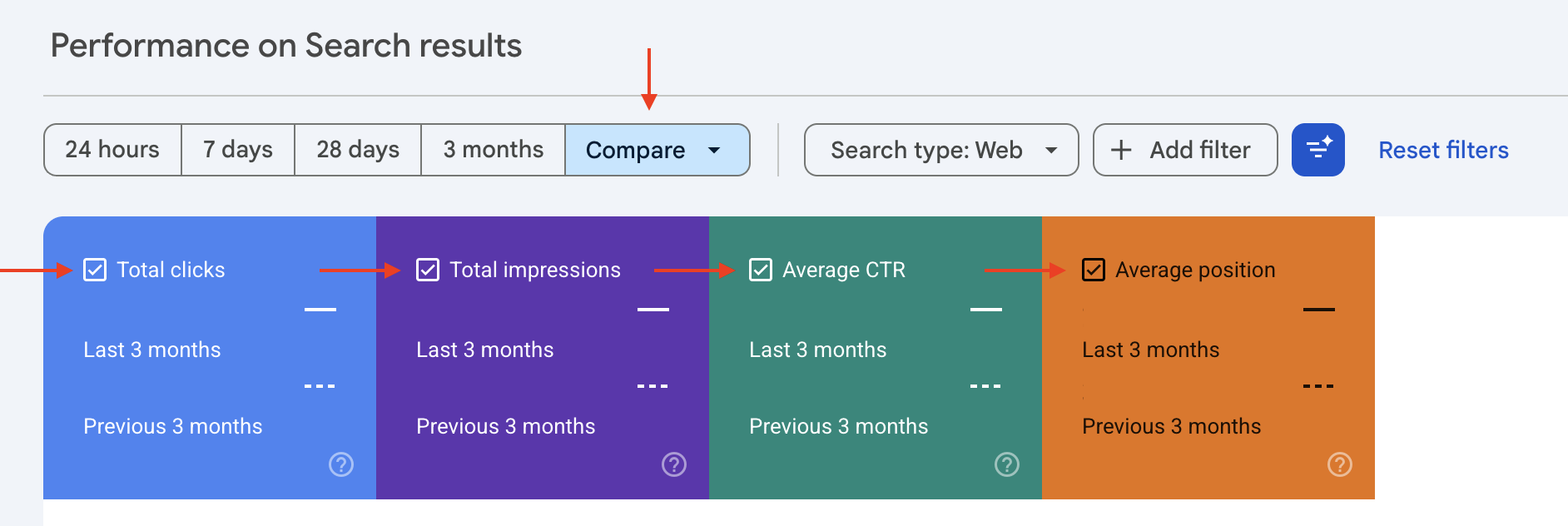
Look for a sustained decline across a full quarter, not one bad fortnight. A page that lost impressions in January and recovered in February probably moved with seasonality rather than quality. Skip percentage thresholds as well, because a drop from 40 clicks to 20 represents a smaller opportunity than a decline from 4,000 to 3,200.
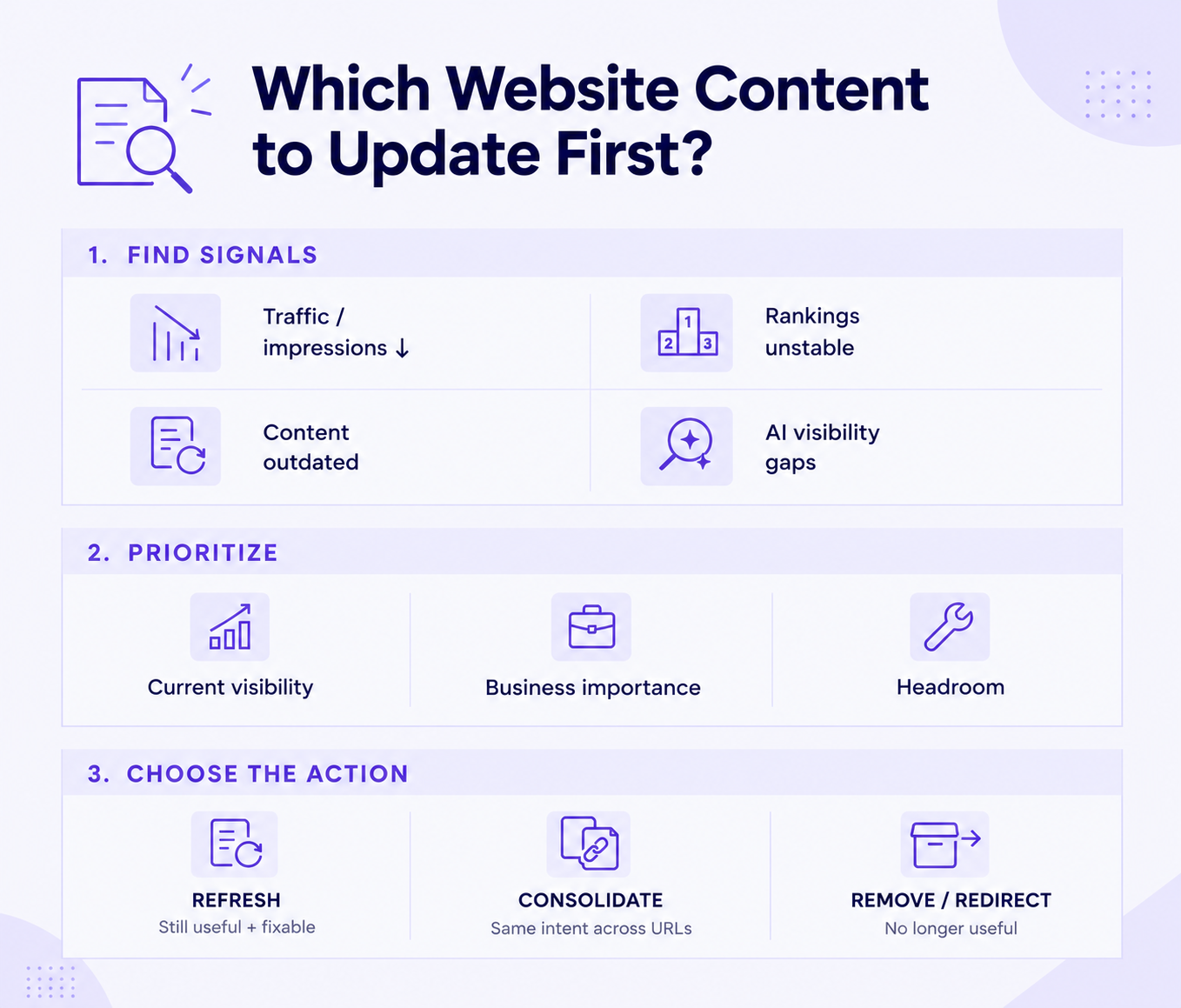
Flag pages when rankings slide or bounce across a range instead of holding position, or when facts, statistics, prices, dates, screenshots, or product details are outdated. Broken internal or external links and CTAs that point to retired offers or convert far below comparable pages are also clear problems.
Other candidates have thin coverage compared with the pages currently outranking them, face a shift in search intent such as results moving from definitions to comparisons, or have lost representation in AI-generated answers for the topic.
Refresh a page when it still serves a real audience and search intent but has lost accuracy, depth, or visibility. HubSpot reports that updating and republishing old blog posts increased monthly organic views to those posts by an average of 106%. That result reflects a substantive rewrite, not a date change.
Consolidate pages when several URLs address the same intent and split their authority. Three overlapping posts on the same question will usually perform better as one stronger page, with the other two redirected to it.
Delete or redirect a page when it covers a discontinued product, past event, or service you no longer sell, and its content no longer justifies a standalone URL.
Evaluate candidates using three factors:
A page ranking eleventh for a commercially valuable query with a weak middle section is usually a better target than one that lost 60% of its traffic for a keyword nobody buys from.
Search Console supplies the traditional search data, but it cannot show whether ChatGPT, Perplexity, or Google’s AI Mode references your brand when someone asks a question your page answers. Scrunch tracks which prompts surface your brand, which pages receive citations, where competitors appear instead, and which third-party sources AI systems use for your category.
Used with Search Console, analytics, and a crawler, this data replaces a vague sense that a page feels stale with a defined visibility problem. For example, a page may be absent from five prompts that matter most in its category.
Keep quick maintenance separate from strategic updates. Correcting a phone number, typo, or dead link may take ten minutes and require no analysis. A visibility-driven refresh needs research, a baseline, and follow-up measurement. Mixing the two can leave teams spending a quarter on cosmetic edits.
The editing priorities change with the type of page. Product records, articles, service pages, and images each have different failure points.
A product’s price belongs on its product record. Changing a figure in the body copy does not change the transaction price.
Verify the underlying information before rewriting the prose. Statistics become outdated, screenshots show obsolete interfaces, and recommended tools may be acquired or shut down.
Homepages and service pages contain navigation, forms, and layout logic, so errors tend to be more visible than they are in a blog post.
Begin by confirming the query and intent the page serves, since both may have shifted since publication. Align the title, headings, body copy, and supporting elements with that intent. Use the terms real searchers use when they fit naturally. Placing a keyword in a fixed number of locations will not repair a page that answers the wrong question.
Complete the search-related work in order:
Repeatedly submitting the same URL doesn't make it rank faster. Reindexing confirms Google has read the new version. Rankings still depend on whether the update improved the page relative to its competitors.
Change the visible date only when a returning reader would recognize a substantive difference.
Changing a date without changing the substance damages credibility. A reader who finds a page marked “Updated last month” alongside screenshots from three interface versions ago and a two-year-old statistic learns that the date cannot be trusted.
In most CMS platforms, the date field appears in the post settings sidebar. WordPress places the Publish date in the document panel. Shopify and Webflow store it as a date field on the record itself.
Do not change the URL of a page that already has visibility unless the change is necessary. A cleaner slug rarely offsets the risk. Some CMS platforms update the slug automatically after a title edit, so check it before publishing.
If the URL must change:
Leaving the old URL unresolved loses accumulated link equity, breaks external citations, and sends visitors to an error page.
Because redirect controls vary by platform, WordPress can use a plugin such as Redirection, Shopify has a built-in URL Redirects panel, Webflow places redirects in project settings, and custom setups may use an .htaccess file or server configuration.
A QA pass checks the page as a complete, public document. Keep software maintenance separate: if a plugin, theme, or platform update runs alongside a content edit, you may not know which change caused a broken layout.
Before publishing:
Aim for a Largest Contentful Paint of 2.5 seconds or better at the 75th percentile of real-user loads. A single uncompressed hero image is a common reason a page misses the target.
After publishing:
Compare the updated page against the baseline you recorded before making changes. In Search Console, pull clicks, impressions, average position, and the queries driving traffic to the URL. Use equivalent periods: compare the first 28 days after the update with the previous 28 days. For seasonal pages, compare a full quarter with the same quarter from the previous year.
Give the page enough time to settle. Google may recrawl and reindex an update within days, but rankings and traffic can take several weeks to stabilize as search systems reassess the page.
Don't limit the review to rankings. An effective content update should be evaluated across four layers:
Traditional rank tracking cannot measure the AI layer. A page can rank third yet remain absent from an assistant’s answer to the same question because AI systems synthesize information from multiple sources. They may rely on third-party reviews, forums, and directories instead of the brand’s site.
This is where Scrunch adds another layer to the post-update review. Instead of stopping at traditional rankings, you can see how your brand and content are represented across the AI answers that matter to your category: which prompts surface your brand, which pages are cited, and which other sources are influencing the answer.
If a page gains traditional search visibility but still isn't being cited in relevant AI answers, the next question is why. The issue could be that the answer is buried too deeply, important entities aren't clearly defined, the page lacks a concise answer that systems can extract, or technical issues are limiting access to the content.
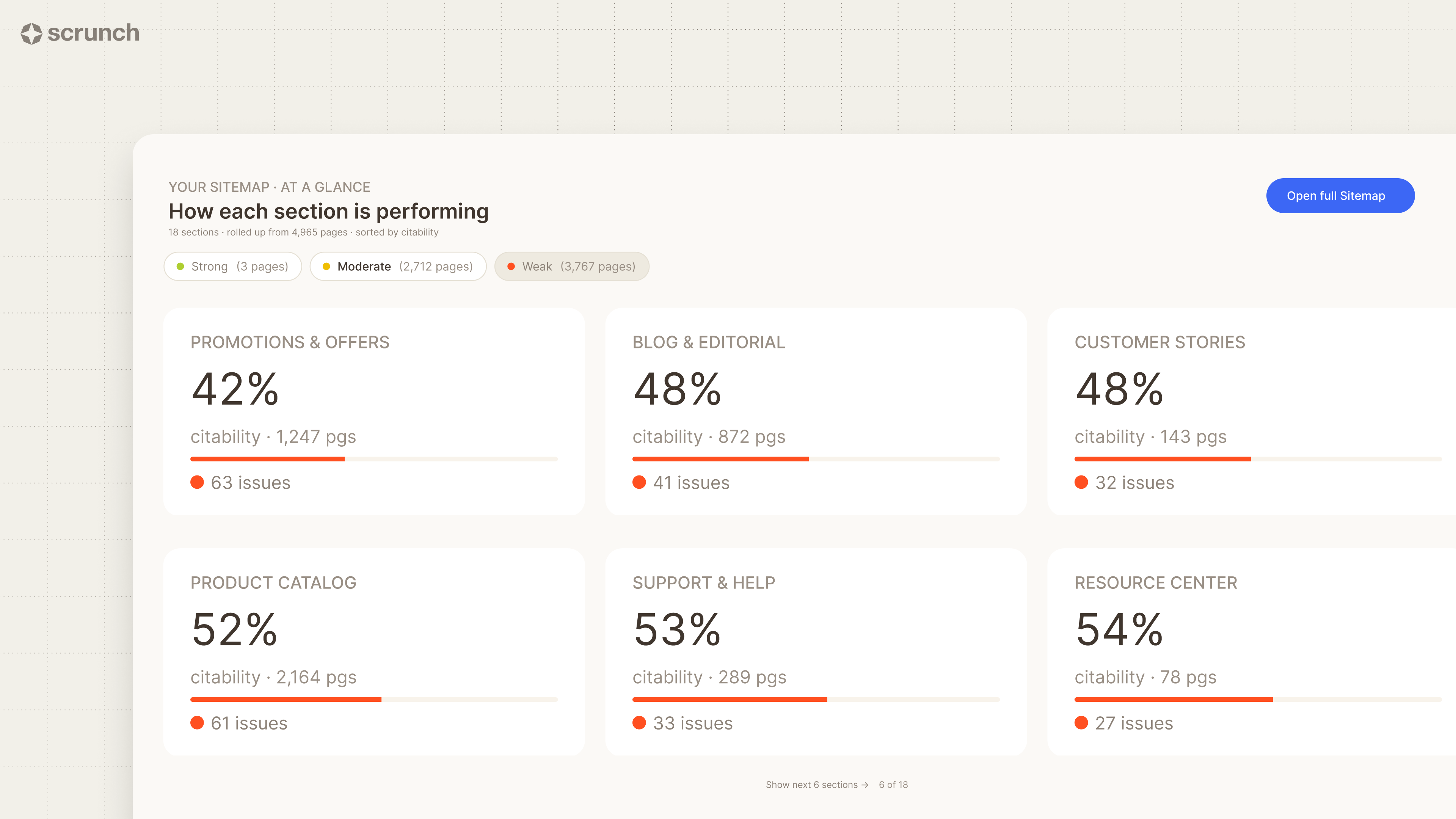
Scrunch Site Optimization helps turn that observation into an action list. Rather than simply flagging that a page has an AI visibility problem, it surfaces the site and content issues that may be limiting how that page is understood and represented in AI search.
Record the results in a standing review log. Include the URL, owner, last reviewed date, next review date, and status. Set the next review based on actual change signals rather than an arbitrary calendar interval:
A fixed six-month schedule can waste time on stable pages while leaving volatile ones untouched for too long. Let the signals determine when a page needs another review.
Changing a date, adding a keyword, and clicking 'Update' only creates activity, and not necessarily giving any results.
Start with a specific signal, diagnose the problem, and choose whether to refresh, consolidate, delete, or redirect.
Then measure the outcome across traditional and AI search. Scrunch can help track how your content appears in AI answers alongside your traditional search performance, giving you a clearer picture of whether the update actually improved visibility.
It can, if the issue is content structure or extractability. Lead with the answer, clarify entities, and make definitions and comparisons explicit. Technical issues like blocked crawlers require separate fixes. Scrunch Site Optimization can help identify what's holding a page back.
There's no universal cadence. Use real triggers instead, such as declining search or AI visibility, product changes, industry shifts, or outdated statistics. For high-output sites, a quarterly review of top pages plus an annual audit is a practical baseline.
Updating improves an existing page without necessarily changing its publication date. Republishing changes the visible date to signal a substantially refreshed version. Don't change the date unless the content has changed enough to justify it.
Check whether you already have a relevant page. If you do, updating it is often better than creating a new URL because it preserves existing links and authority. Create a new page when no relevant page exists, and consolidate when multiple pages compete for the same topic.
Only if the platform saves changes directly to the live page. WordPress, Webflow, and Squarespace can hold changes in drafts or staged states until publication. Shopify product edits and direct HTML uploads appear immediately, so prepare those changes in one complete pass.
For a first refresh, update one page completely and measure the result before expanding the process. This shows what changed before the same approach is repeated across twenty pages. For an ongoing program, batch size depends on review capacity. Keep individual reindexing requests under the roughly 10 to 12 daily limit and use an updated sitemap for larger batches.

Irina is a Founder at ONSAAS, Growth Lead at Aura, and a SaaS marketing consultant. She helps companies to grow their revenue with SEO and inbound marketing. In her spare time, Irina entertains her cat Persie and collects airline miles.
.svg)
.svg)
.svg)

.svg)
%20(1).svg)
%20(3).svg)
.svg)
.svg)