
.svg)
%20(1).svg)
%20(3).svg)
Back to articles
8 Best CRM for Nonprofits I Found After Weeks of Testing
June 25, 2026
By
Irina Maltseva
Most nonprofit teams don’t go CRM shopping because a vendor shows up in their inbox.
The search starts when they can’t get a clear picture of fundraising from their current tools. Donations sit in one system, email activity in another, and event and volunteer records somewhere else. Numbers don’t align, while boards and funders keep asking for clarity around retention, pipeline, and campaign performance.
Meanwhile, donor expectations climb. They want faster responses and messages that feel personal. But manual exports slow down every follow-up, and high-value supporters go unnoticed. That’s when teams start looking for the best CRM for nonprofits to unify data, engage donors, and cut manual work.
To shape this list, I spoke with nonprofits juggling messy data, heavy admin work, tight budgets, and growing retention pressure. We also talked to donors who expect faster updates and a clear sense of impact. The list below spotlights the best nonprofit CRMs based on real needs from both sides.
See the table below for a quick, side-by-side view of the essential features of top CRM software for nonprofits.
Nonprofits don’t need the flashiest CRM. They need one that fixes daily headaches and grows with the team that uses it. Here’s how nonprofits can evaluate CRMs to find the one that solves the problems they face without introducing new ones.
Keep these in mind as you read through the list of tools I tested below.
When I compared what nonprofits struggle with and what donors expect, only a handful of CRMs addressed both. The ones that did are the ones that ultimately made my list of the top CRM software for nonprofits. They’re ranked in order of how well they match the needs of nonprofits and donors.
Most nonprofits piece together a CRM, an email platform, a fundraising page builder, and event tools to get through the year.
Givebutter pulls all of that into one system for nonprofits, so teams don’t have to stitch together an event software with platforms like Mailchimp, GoFundMe, or HubSpot. And underneath all of that, it still operates as a full nonprofit CRM with unlimited contacts, giving history, interaction logs, and campaign capabilities. No surprise it’s rated 4.7 out of 5 by more than 1,700 users on G2.
Givebutter includes a built-in Wallet where nonprofits can earn 2.5% APY rewards on every donation. Settled donations move into the Wallet daily, with no minimum balance or monthly or transfer fees. Plus, you get real-time tracking and FDIC pass-through insurance up to $250K.
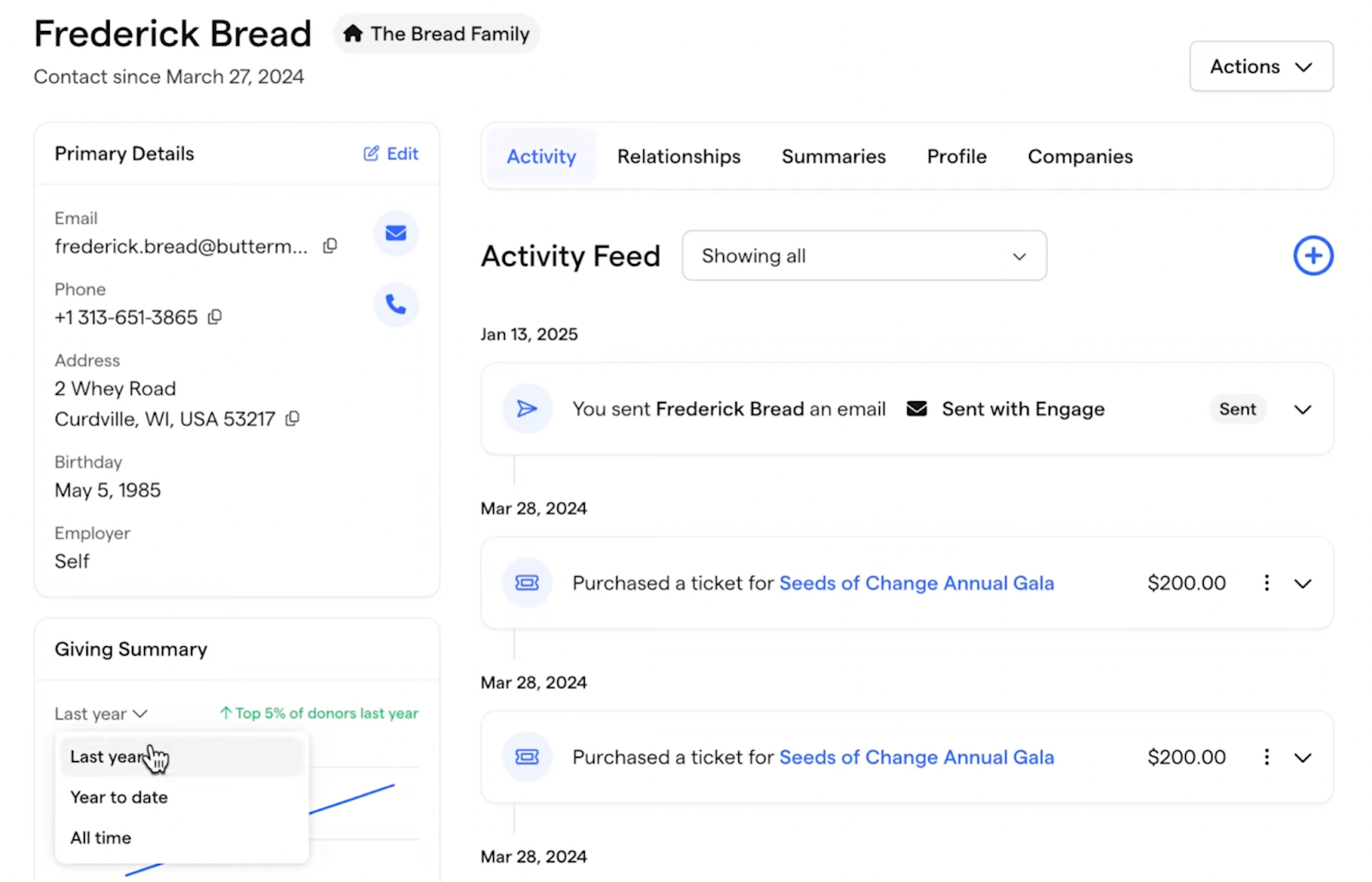
Givebutter shines in contact and donor management. Each supporter has a rich profile that shows their giving history, ticket purchases, recurring donations, custom fields, tags, notes, and household connections. This makes it easy to grasp their full journey with your organization. Profiles update automatically as people donate, attend events, or engage with your messages. And that’s how your donor records stay dynamic instead of collecting dust.
All of this becomes even more useful because Givebutter pairs donor management with fundraising. Donation drives, ticket sales, payments, and receipts tie directly into donor profiles. Event pages, campaigns, and donation forms also live inside the CRM, giving you a clear view of donor behavior and fundraising performance.
Nonprofits looking for more automation, reporting, or marketing power can opt for Givebutter’s paid ‘Givebutter Plus’ tier.
This unified setup extends into engagement, too. Givebutter’s built-in email marketing means your fundraising data and your outreach finally work together. The platform supports direct mail fundraising without needing a separate platform. Nonprofits can send unlimited branded emails, personalize them through merge fields, and build campaigns with drag-and-drop ease.
You also get built-in segmentation, scheduling, and performance tracking. This tight link between CRM, fundraising, and marketing is a major reason Givebutter stands out.
The core CRM and donation tools are free, making it accessible for small teams with limited budgets. That said, these strengths come with a few trade-offs. Since Givebutter covers many functions, new users may need time to explore and master the full system. Plus, Givebutter uses a tip-based pricing model. There’s no platform fee when donors choose to add a tip at checkout. Nonprofits that don’t want to rely on donor tips can disable tips and pay a platform fee instead. Even with these caveats, Givebutter is still one of the best modern, affordable CRM software for nonprofits.
Because Givebutter does so much, new users may need time to learn the full system. And the tip-based pricing model won’t work for every nonprofit, especially if they don’t want to rely on donors to cover platform costs.
“One improvement that we would like to see is a more robust Givebutter mobile app for on-the-spot transactions and onsite event management and experience.”
- Givebutter Review, Olivia V.
Bloomerang is one of the top donor databases for nonprofits. The platform unifies donor management, fundraising, and engagement, but its real value is the depth of insight it gives you into your supporters.
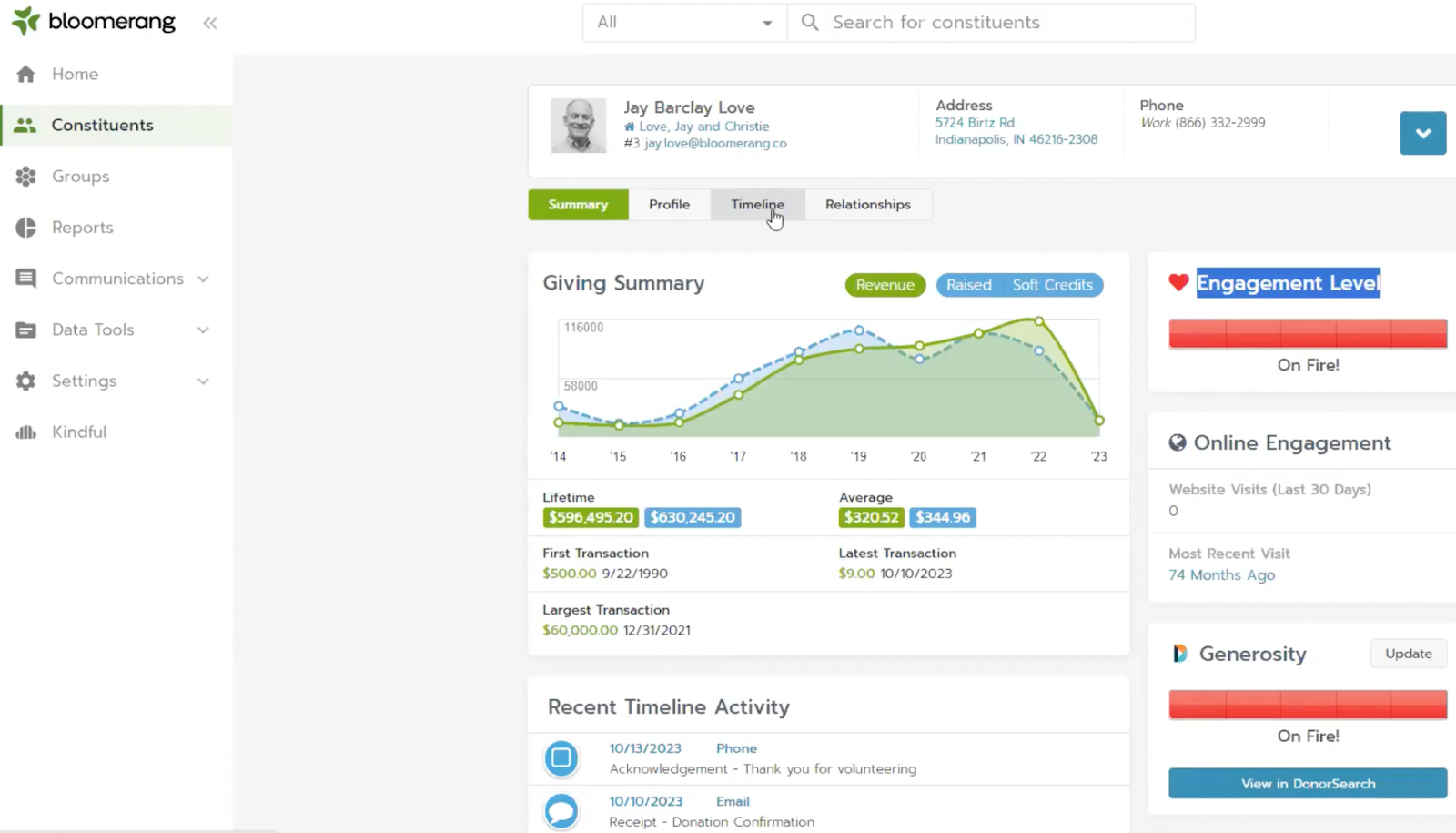
Donor profiles go far beyond basic contact records. Each supporter has a living timeline that shows every donation, interaction, note, and touchpoint in one continuous view. You immediately see how someone engages with your organization.
Bloomerang also surfaces loyalty indicators and giving potential, helping you understand who’s committed, who’s drifting, and who may be ready for a larger ask. Plus, your data stays clean since profiles update automatically as donors interact with your emails, events, and forms.
Fundraising ties directly into the CRM. Online donation forms, event registrations, recurring gifts, peer-to-peer campaigns, and auctions all feed into donor timelines in real time. Bloomerang’s interactive dashboards reveal giving trends, donor growth, retention patterns, and campaign results, so you can see what’s working and make quick decisions.
Bloomerang includes built-in email marketing workflows that help nonprofits connect with supporters. Dynamic donor groups keep your messages relevant. AI-powered email tools make drafting and scheduling fundraising campaigns faster, especially for small teams. And free nightly address updates mean your mailings consistently reach the right people without costly returns.
Pricing is tiered, and there’s no free version. Bloomerang’s Fundraising module starts at $40 per month when billed annually. The core CRM begins at $125 per month on an annual plan. Their Volunteer module is priced separately, starting at $119 per month, billed annually.
There are trade-offs. New users may need time to get comfortable with the platform’s layered insights. Event-heavy organizations or teams needing complex marketing automation may still rely on integrations. And the lack of a free plan may be a hurdle for small teams. Even with these considerations, Bloomerang is one of the strongest CRMs for nonprofits looking for sharper donor insights and stronger donor relationships.
Bloomerang’s depth is valuable, but it also means new users may need time to navigate the system. The pricing structure, with no free option, may also be a barrier for smaller nonprofits.
“I wish Bloomerang's built-in email tool would more easily allow me to resend emails to donors who didn't respond to the first one.”
- Bloomerang Review, Colleen T.
DonorPerfect is one of the best CRMs for charities looking to manage donors, process gifts, and run fundraising programs from one place. It’s ideal for nonprofits that want structure, reliable workflows, and a record of every supporter’s history.
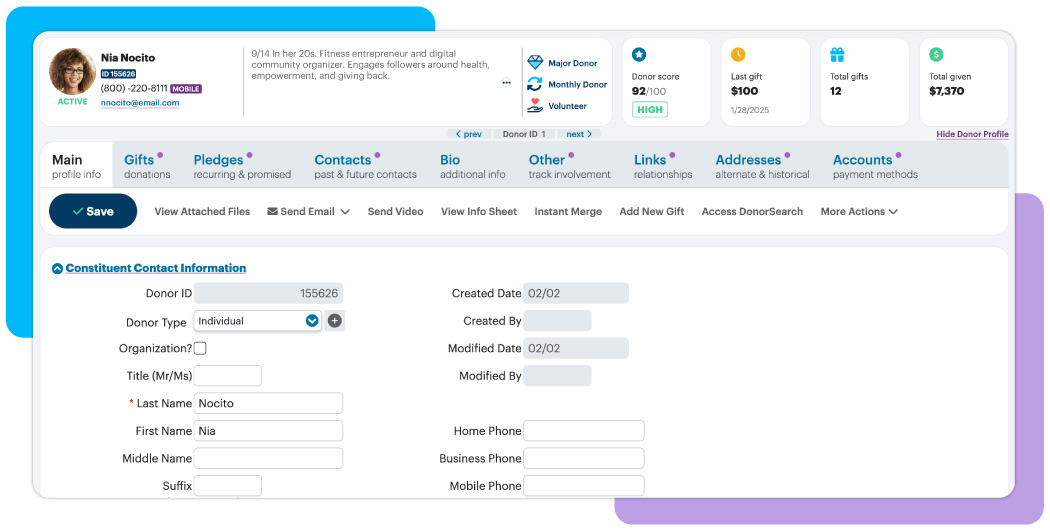
A donor’s entire relationship with your nonprofit sits in one place. Each donor profile stores contact details, giving history, pledges, soft credits, event attendance, and volunteer involvement. These profiles grow over time as donors give, register for events, or interact. Plus, the platform can automatically run receipts, acknowledgments, pledge reminders, and follow-ups.
Fundraising runs through the same system. Online donation forms, recurring giving, mobile payments, pledge tracking, auctions, peer-to-peer fundraising, and event registrations sync directly into the CRM.
Batch entry tools help staff enter gifts faster and reduce errors. You can also split gifts, tributes, matching gifts, pledge payments, and soft credits. Dashboards pull everything together so you can see giving trends, donor retention, major gift pipelines, and campaign performance without building reports from scratch.
Donor engagement tools build on top of this structure. Every DonorPerfect plan comes with a Constant Contact account for email marketing. This integration lets staff send email campaigns, automate acknowledgments, create segments, and track donor responses. Supporters can update their details or manage their giving through a donor portal, while fundraisers use the mobile app to pull up donor insights or log activity on the go.
Nonprofits that rely heavily on accurate data and structured processes tend to benefit most from DonorPerfect. But there are limitations. The interface is more traditional than modern platforms, meaning new users may need time to learn it. Groups that run complex events or advanced marketing automation may still rely on outside tools. Even with these trade-offs, DonorPerfect is a strong option for nonprofits that prioritize clean data, reliable donor histories, and predictable fundraising processes.
The software comes in three tiers:
Pricing isn’t published publicly, so you’ll need to contact the team for a custom quote.
The older-style interface can slow down onboarding, and teams that need strong event or marketing tools often still rely on external platforms. Beyond that, the absence of a free tier is a barrier for very small organizations whose resources are already too tight.
“DonorPerfect's reporting functions are not intuitive, making it a difficult piece of software for new staff or occasional users.”
- DonorPerfect Review, Naomi M.
Donorbox is a fundraising and donor management software ideal for nonprofits looking to collect donations and manage supporters. It combines online giving tools, a lightweight CRM, and engagement features in one system that’s easy for small and mid-sized teams to adopt.
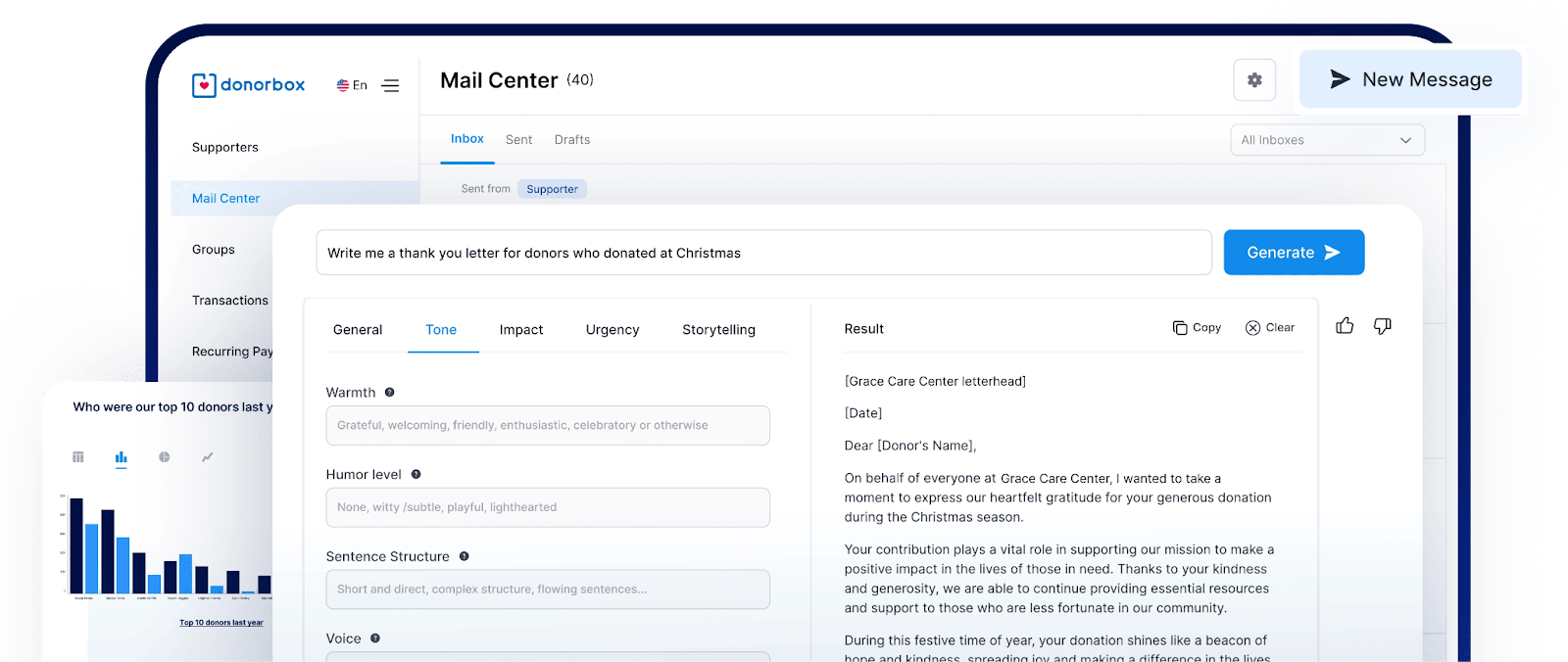
Donorbox’s CRM centers around a donor database that keeps supporter information in one place. Each profile stores contact details, giving history, recurring plans, communication notes, and engagement activity. It also updates automatically as people donate or interact with your campaigns. Nonprofits can add custom fields, segment supporters, and track activity from the dashboard.
Fundraising tools feed directly into these records. Donorbox supports one-time and recurring gifts, memberships, text-to-give, in-person donations through terminals, crowdfunding pages, and a peer-to-peer fundraising platform. Every gift lands in the donor’s profile with payment details and campaign context.
Donation forms and pages load quickly, are easy to embed, and support modern payment methods like Apple Pay, Google Pay, bank transfers, and credit and debit cards. You also get features like suggested amounts, upgrades, and abandoned-donation recovery to increase conversions with minimal effort.
Donorbox also provides automated email acknowledgments, customized receipts, and basic donor segmentation tools. You can connect Donorbox with ActiveCampaign, Mailchimp, or Constant Contact for more advanced communication like newsletters, journeys, and multi-step campaigns.
While the CRM is functional, it isn’t as robust as databases designed specifically for donor management. Reporting is clear but limited compared to enterprise systems, and organizations that rely on sophisticated automation or event-heavy nonprofit fundraising may still need outside tools. Even so, Donorbox remains a strong fit for small and mid-sized teams that value fast setup, strong donor experiences, and recurring giving.
The Standard plan is free and gives nonprofits unlimited forms, campaigns, event ticketing, QuickDonate™, and reporting, with processing fees between 2.95% and 3.95%. However, the free plan doesn’t come with a CRM. Donorbox CRM costs you $75 for 500 contacts, when paid annually. The Pro plan costs $150/month and drops fees to 1.75%-2%. It adds Jay·AI, advanced customization, deeper analytics, API access, and supports crypto and stock gifts. You can also request a custom quote from the Premium plan.
Donorbox works well for basics, but larger nonprofits may feel limited by the light CRM and simple reporting. You’ll need integrations for advanced marketing or event-heavy workflows.
“The basic level of Donorbox feels limiting. The tiered fees can be restrictive compared to platforms that charge higher rates per processed donation. The donor management and CRM-level functionalities are quite basic, and they wouldn't serve our needs without integration with Salesforce. I would love for the campaign setup to be more straightforward and customizable, with enhanced design flexibility, clearer visual options, and intuitive tools for tailoring donation pages without requiring much technical know-how.”
- Donorbox Review, Mike P.
Neon is built for nonprofits that want donor management, fundraising, events, volunteers, memberships, and communications in one CRM solution.
The platform includes built-in email and text messaging. Staff can send personalized emails or texts directly from the platform, and workflows automate follow-ups or scheduled sends. Supporters get access to self-service portals where they can manage their information, donations, memberships, and registrations.
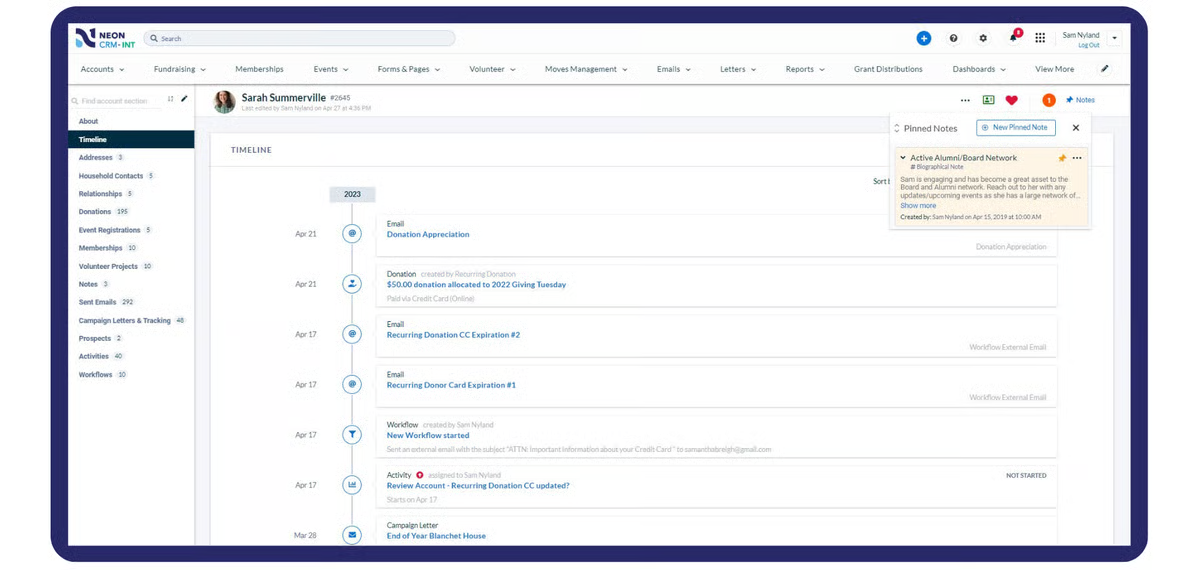
Teams can also create branded donation forms, event RSVPs, and membership signups inside Neon CRM, and all activity syncs instantly. Real-time reports and more than 50 prebuilt templates help teams track performance, retention, and revenue.
Neon CRM also handles events, volunteers, and membership programs without requiring separate systems. You can manage seating, ticketing, check-ins, volunteer scheduling, shifts, and membership renewals from the same place. Integrations, including QuickBooks and an Open API, let you connect the rest of their tech stack.
There are trade-offs even with these strengths. Some users struggle to build custom reports. Complex filters also take time and effort to use. A few features feel limited or rigid. For example, event-ticketing forms don’t support complex pricing tiers by default, creating extra work for teams that sell multiple types of tickets. Still, Neon CRM remains a strong option for small and mid-sized nonprofits that want a single system for donor management, multi-program support, and integrated communication tools.
Pricing starts at $99 per month for core donor, fundraising, and communications tools. The mid-tier $209 plan expands into events, volunteers, and multi-program management. The top-tier $409 plan includes automation features that help nonprofits save time and increase impact. Many features like peer-to-peer fundraising, membership configuration, and workflow automation are available as paid add-ons.
Custom reporting feels harder than it should. Complex filters slow things down, and some features, like event-ticketing tiers, feel limited. These gaps create extra work for teams with more advanced needs.
“The biggest issue is that the new donor and event forms don't support multiple pricing on tickets to events, such as at a banquet when we sell tables for 8 or 10 guests and at different pricing levels. I have to use the Legacy forms, which are much more cumbersome to work with. Also, some of the reports and linked reports don't work right.”
- Neon Review, Anne M.
Keela is a cloud-based CRM that unifies donor management, fundraising, communications, and engagement. It’s made for nonprofits that want one platform to track supporters and run campaigns without juggling multiple systems.
Keela’s fundraising tools integrate tightly with the CRM. The platform lets you create AI-powered donation forms with preset gift asks, recurring giving prompts, and quick checkout flows. All donations sync to donor records automatically.
Campaign tracking, forecasts, and tax-compliant receipts come built in, and dashboards provide real-time views into cohort behavior, LYBUNT/SYBUNT retention, and campaign performance. While Keela supports volunteer management, projects, and grants, its native event management features are still limited.
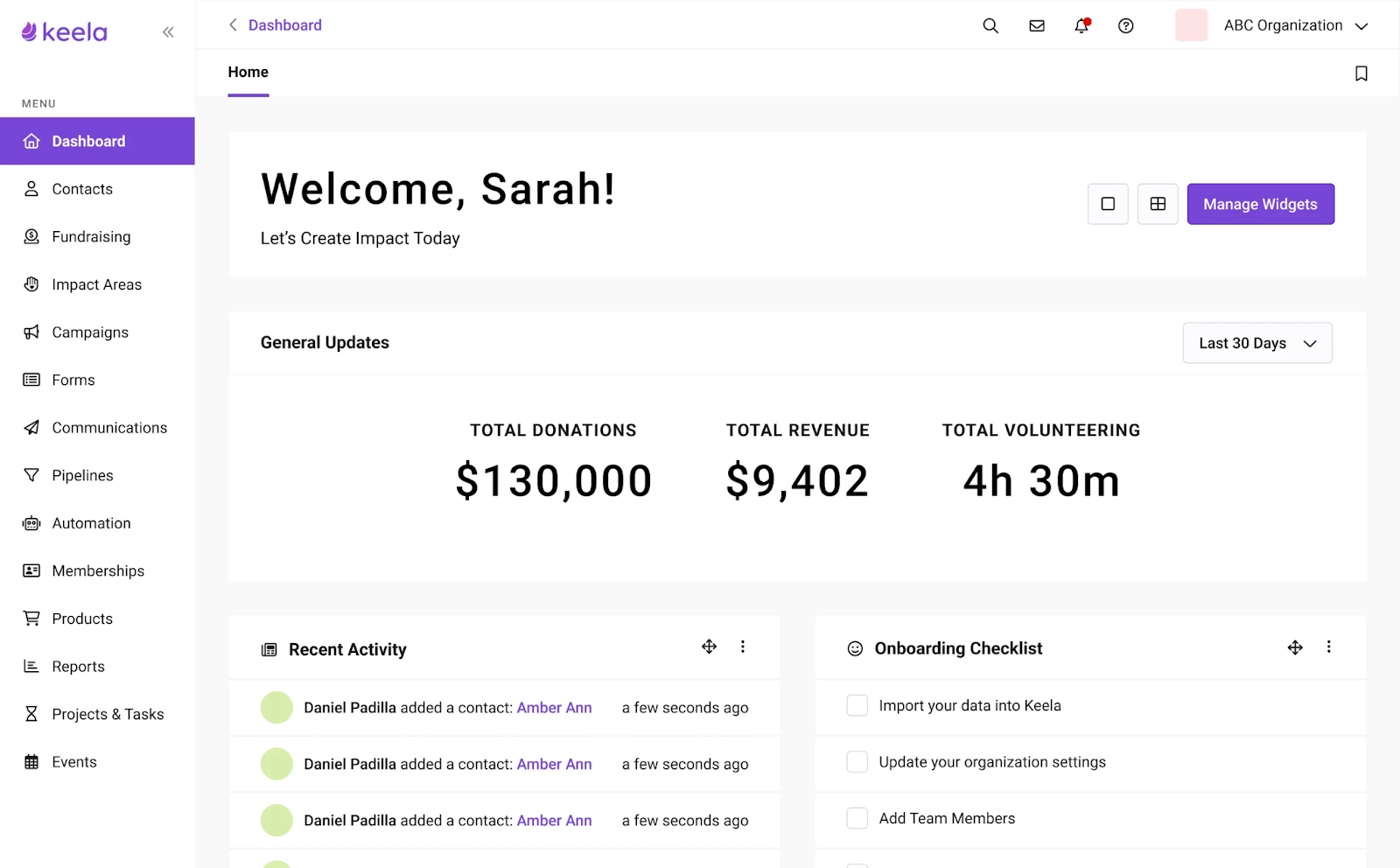
Plus, the platform offers a wide set of donor management features. You can build complete donor profiles with full gift histories, household relationships, soft credits, and custom fields. Automation tools help nonprofits streamline stewardship by sending receipts, thank-you messages, and lapsed-donor nudges through pre-built or customizable workflows.
There are trade-offs to weigh. Some users find that data management becomes messy due to limited approval workflows and basic cleanup tools. Others note that email tools work well for simple campaigns but lack the design flexibility found in dedicated marketing platforms. Still, Keela works especially well for teams moving off spreadsheets and looking for better donor journeys, automated outreach, and integrated fundraising software.
There’s no free tier available, and Keela’s pricing starts at:
Unlimited email support comes with every Keela plan, but unlimited live chat and scheduled phone support are available through the $200/month Premium Care plan, in addition to your base plan.
Some features still feel underpowered. Event tools are limited, automations can run with small delays, and onboarding requires patience for new team members. The cost increases with contacts, which makes Keela harder to justify for larger databases.
“At times, we’ve encountered small limitations in the flexibility of certain features. The email design tools work well, but aren’t as advanced or customizable as those in dedicated email marketing platforms. Similarly, the integration options are solid but not as extensive as what larger CRM systems offer.”
- Keela Review, Rebekah T.
Little Green Light is an all-in-one fundraising and donor CRM for nonprofits. It replaces the patchwork of spreadsheets, email tools, and standalone donation forms with a single system you can access from anywhere.
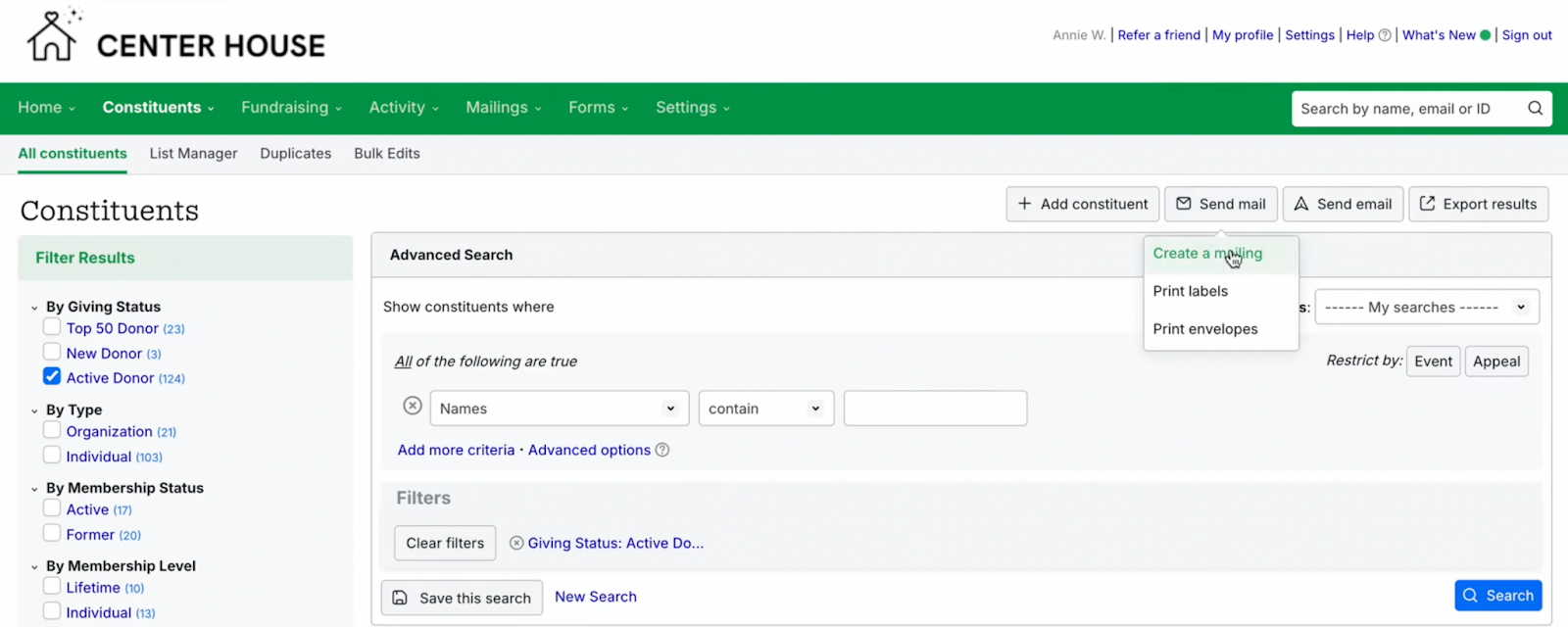
The CRM shines in helping teams understand their donors at a deeper level. You can add your own fields, tag supporters in meaningful ways, and build saved searches that behave like smart, dynamic lists.
Gift tracking is comprehensive as well. Monetary gifts, in-kind support, memorial or honorary donations, matching gifts, pledges, and recurring donations all flow straight into the record. When someone gives online through an LGL donation form, it appears instantly in their profile, ready for acknowledgment or reporting.
Fundraising and stewardship sit naturally inside the CRM experience. You can embed custom online forms, log every gift or interaction, generate receipts or batch letters, and use mail merge to produce appeals, labels, or envelopes. Each mailing or communication effort is stored inside the constituent record, giving you a full engagement timeline without extra effort.
You can also create your own reports, use templates, or build complex queries to analyze donor patterns, LYBUNT/SYBUNT lists, campaign progress, and long-term trends.
That said, there are trade-offs, especially for nonprofits with advanced technical needs. Reporting is flexible but can feel cumbersome when building complex queries. Integration options are limited, meaning you can connect with a handful of services like Mailchimp and Stripe. That said, Little Green Light offers a balanced solution that fits how small to mid-sized nonprofits work.
Pricing starts at $45/month for up to 2,500 records and scales to $60 and $75/month as your database grows. Larger organizations can manage up to 50,000 constituents for $135/month.
Getting a donation is one thing. Turning that donor into a lasting supporter is the real challenge. That’s where Funraise stands out.
Funraise is built for nonprofits that prioritize online fundraising, recurring giving, and donor experience. It combines donation tools, campaign management, and a modern CRM into one system, with a strong focus on growing predictable revenue.
Donor profiles in Funraise give you a clear view of each supporter’s journey. You can track donation history, recurring plans, engagement activity, and campaign participation in one place. Profiles update automatically as donors give, sign up for campaigns, or interact with your forms, helping teams maintain accurate data without constant manual work.

Fundraising tools are where Funraise really shines. The platform offers customizable donation forms, campaign pages, embeddable widgets, and peer-to-peer fundraising. Everything is optimized for conversion, especially on mobile devices. Recurring giving is deeply integrated, with features designed to encourage monthly donations and reduce churn over time.
All fundraising activity feeds directly into the CRM. You can see which campaigns drive the most revenue, which donors convert into recurring supporters, and how different segments respond to outreach. This connection between fundraising and donor data makes it easier to refine campaigns and improve retention.
Funraise also supports integrations and API access, allowing nonprofits to connect it with tools like Salesforce, email platforms, and payment systems. Automation features handle receipts, confirmations, and basic donor communications, helping teams reduce manual work and respond faster.
There are trade-offs to consider. Funraise is built primarily for digital fundraising, so nonprofits that rely heavily on offline workflows or complex program management may need additional tools. Some users also note that reporting and CRM depth aren’t as advanced as more traditional donor databases.
Pricing starts at $0/month for the Essential plan; Their Premium plan starts at $99. Funraise also uses a Donors Cover Fees model, where platform fees are only charged when donors choose to cover them.
Even with these limitations, Funraise is one of the best CRM options for nonprofits focused on scaling online fundraising, improving donor experience, and building a strong base of recurring supporters.
Funraise is less suited for nonprofits that need deep offline workflows or highly complex program management. Reporting and CRM functionality may also feel limited for organizations with advanced data needs.
“I think the only thing about Funraise that isn't spectacular is honestly our own fault at this point. There are numerous features we aren't accessing yet as it is more robust than our small org needs at this point. I'm looking forward to using it in the future.”
- Funraise Review, Laura G.
A nonprofit CRM helps teams centralize donor data, streamline fundraising, automate outreach, and improve retention by giving a clearer picture of supporter behavior and engagement.
A strong nonprofit CRM should include donor and contact management, fundraising and donation tracking, email and communication tools, reporting, automation, and integrations that reduce manual work.
The best CRM for nonprofits depends on size and needs. Platforms like Givebutter, Bloomerang, and DonorPerfect consistently rank highly for ease of use, donor insights, and fundraising tools.
Small nonprofits with tight budgets often choose Givebutter, Little Green Light, or Keela because they offer affordable pricing, simple onboarding, and strong donor-management features.
Yes. Platforms like Givebutter and HubSpot for Nonprofits offer free CRM plans, making them accessible options for smaller teams.
Givebutter, Bloomerang, DonorPerfect, and Neon CRM are frequently praised for donor analytics and reporting. They offer deeper visibility into donor retention, giving patterns, and supporter engagement.
The best depends on your nonprofit’s budget, size, and needs. Some of the widely recognized top picks are Givebutter, Bloomerang, Keela, Neon CRM, and Salesforce Nonprofit Cloud.

Irina is a Founder at ONSAAS, Growth Lead at Aura, and a SaaS marketing consultant. She helps companies to grow their revenue with SEO and inbound marketing. In her spare time, Irina entertains her cat Persie and collects airline miles.
.svg)
.svg)
.svg)
.svg)
.svg)