Workflow process automation is the use of digital tools to automate manual workflows. And it’s on the rise
Improving productivity by up to 30% and reducing errors by a whopping 75%, workflow automation is the key to faster returns on investment for your business.
The question is, how can your team use it to their advantage? While workflow process automation is revolutionising team collaboration in the workplace, only 4% of companies have fully automated their strategies.
With a significant opportunity for deeper adoption, let’s take a closer look at some of the easiest automated swaps you can introduce into your workflow to improve efficiency, visibility, and scalability across teams.
Workflow process automation is the use of digital tools to automate manual workflows. These could include repetitive tasks such as data collection, syncing sales cycles, or processing invoices. Replacing manual workflows with software-driven actions, automation technology is the key to freeing up employees to focus on more strategic work.
Powered by a set of predefined rules, automated workflow tools are designed to trigger actions based on an "if this, then that" sequence. For example, an email-based automation tool could be triggered to automatically send a welcome email to a new contact who has just been added to a database.
With the ability to complete tasks faster without the need for human intervention, it’s no surprise that businesses can save an average of $46,000 annually through workflow automation alone.
This raises an important question: just how much time, effort, and money could your team save when investing in workflow automation?
Let’s take a look at some signs it might be time to upgrade your manual workflows for a better return on investment.
Before investing in workflow process automation, it’s important to first audit your current workflows.
Are you dealing with persistent errors and losing time when copying and transferring data between tools? These are just a few signs that your manual workflows could be holding you back.
Does your business currently struggle with any of these challenges?
Manual workflows are out, and automation is in. If your business is still relying on manual data moving, outdated spreadsheets, and manual approvals, it’s no surprise that you encounter frequent errors.
You are not only making your team’s lives harder, but you risk losing customers and clients as well.
If you’re deciding to automate some of your workflows, the key here is to start slowly and build up your automation sequences.
Start by mapping your current workflow processes step by step to identify data inconsistencies, delays, and other workflow blockages caused by manual handling.
It's important first to automate those quick wins. These are low-value, high-frequency tasks that can be automated easily to save team members' time.
As teams adopt new automated workflows, proper onboarding and training become just as important as the tools themselves. That’s why you should also consider investing in top-rated LMS platforms for employee training to help them learn new processes faster, improve adoption of digital tools, and maintain productivity across departments.
With this in mind, we’ve put together a list of simple automated workflows you can sink your teeth into as a workflow process automation beginner.
Now that we’ve covered the manual workflows holding your team back, let’s dive into how you can fix them.
Here are six practical workflow automation examples and the tools to build them.
Repetitive copying and pasting of data is a one-way ticket to errors and inconsistencies when sharing information across teams.
The ability to automatically send form submissions to your CRMs, email platforms or even collaborative apps like Slack, tools like Zapier and Make are brilliant beginner workflow applications to invest in.
Automating this data sync not only removes the risk of leads slipping through the cracks just because someone forgot to paste them into the right tool, but also saves your team from investing in multiple platforms in the first place.
For example, Zapier’s ‘Zap’ feature allows users to map data fields from the source app to the corresponding fields in the destination app. This means that when an action is completed on one touchpoint, Zap is automatically triggered and transfers this data to corresponding bases such as your CRM system or a Google Sheet.
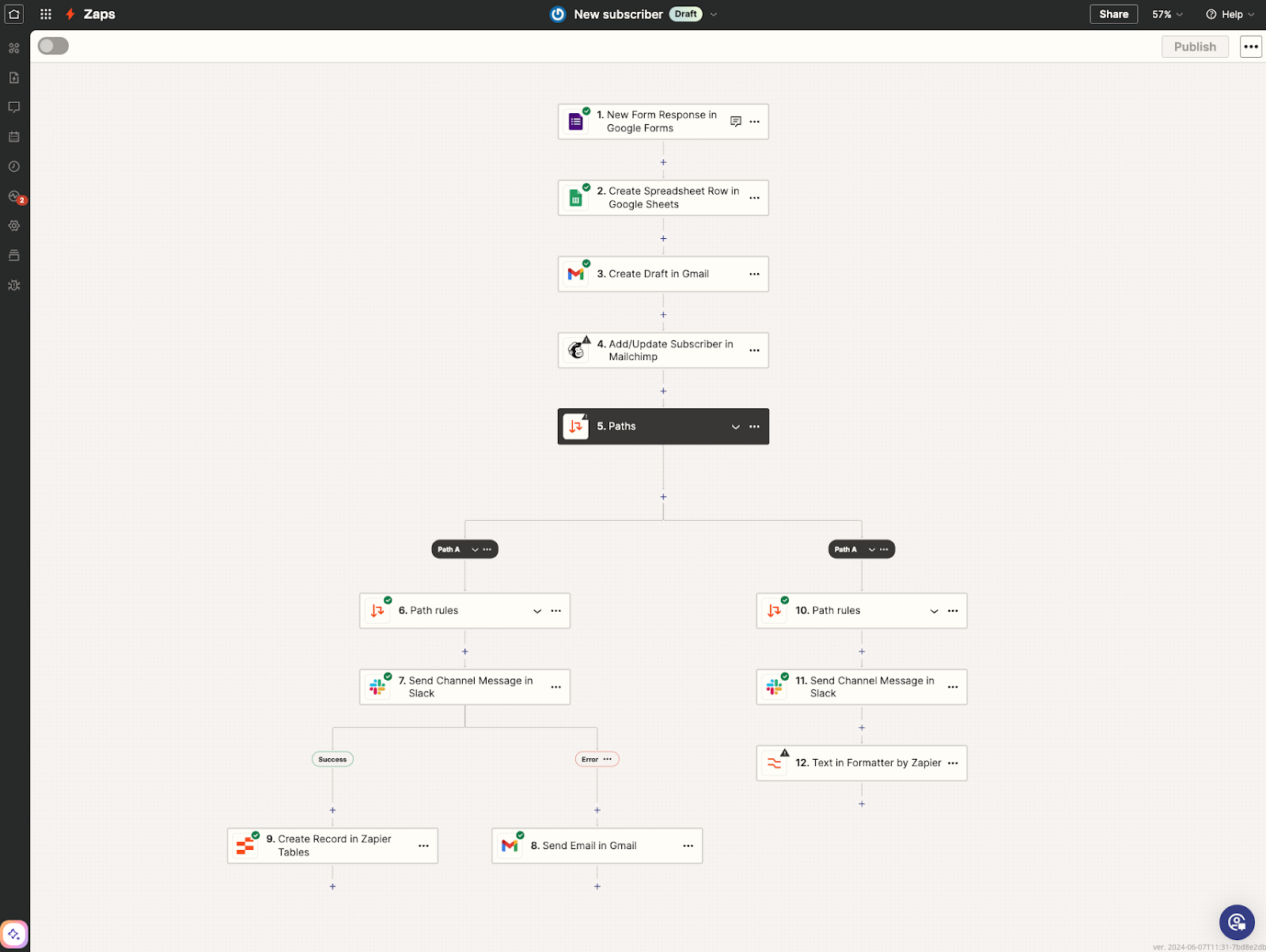
Better still, Zapier’s Formatter tool automatically cleans, reformats, and standardizes your data before it is entered into the destination tool/system. This is key if you want to ensure data accuracy and consistency.
For instance, say one of your e-commerce leads responds to an Instagram lead Ad at 12 am. An automated workflow sequence can instantly push that data into your CRM, so your sales team sees it first thing in the morning.
This automation is especially valuable if your team is running campaigns across multiple channels. Your data sharing remains consistent 24/7 without requiring any human intervention.
Automating your task management is also an easy place to start when integrating workflow process automation into your team strategy. There will be no more chasing colleagues for updates, missing deadlines, or wondering who's responsible for what.
Tools like Monday and ClickUp allow you to create tasks automatically when a form is filled and automate notifications for project stage changes, ticket raising and cross-team collaboration.
Monday allows you to create no-code, logic-based "if this, then that" automations to handle repetitive tasks. You can automatically update statuses, send notifications to team members when certain actions trigger, or move items between boards without confusing colleagues.
If your marketing team is running multiple campaigns. Setting up auto-generated tasks whenever a brief is created takes the pressure off project managers to manually assign owners and send reminders.
The workflow handles itself: brief submitted → task created → owner assigned → deadline set → reminders sent.
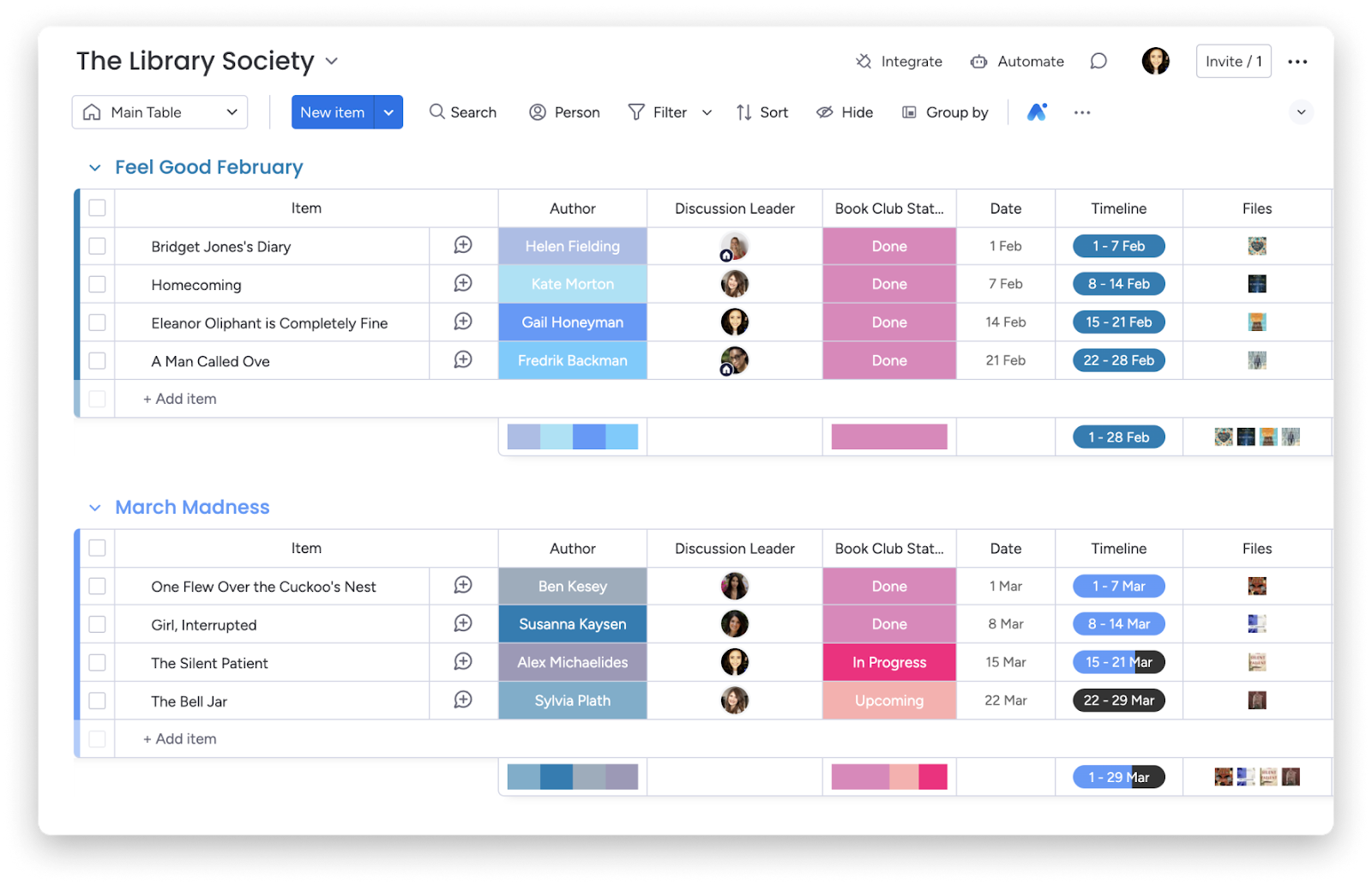
Whether you want to automatically update statuses, send notifications to other team members when a certain action is triggered, or seamlessly move items between boards without confusing colleagues, Monday’s automation workflow can help you prioritize task management.
If you want to keep your team informed without conducting those time-consuming manual check-ins, why not use an automation workflow to trigger real-time alerts and notifications for your whole team?
Tools like Slack are brilliant at this. If you’ve ever discovered a missed deadline only when it was too late, opting for a tool that sends your team real-time alerts prevents that panic.
With the ability to send automated alerts when tasks are overdue or blockers emerge, Slack’s no-code Workflow Builder tool instantly notifies any team members involved in the project and can help speed up the workflow.
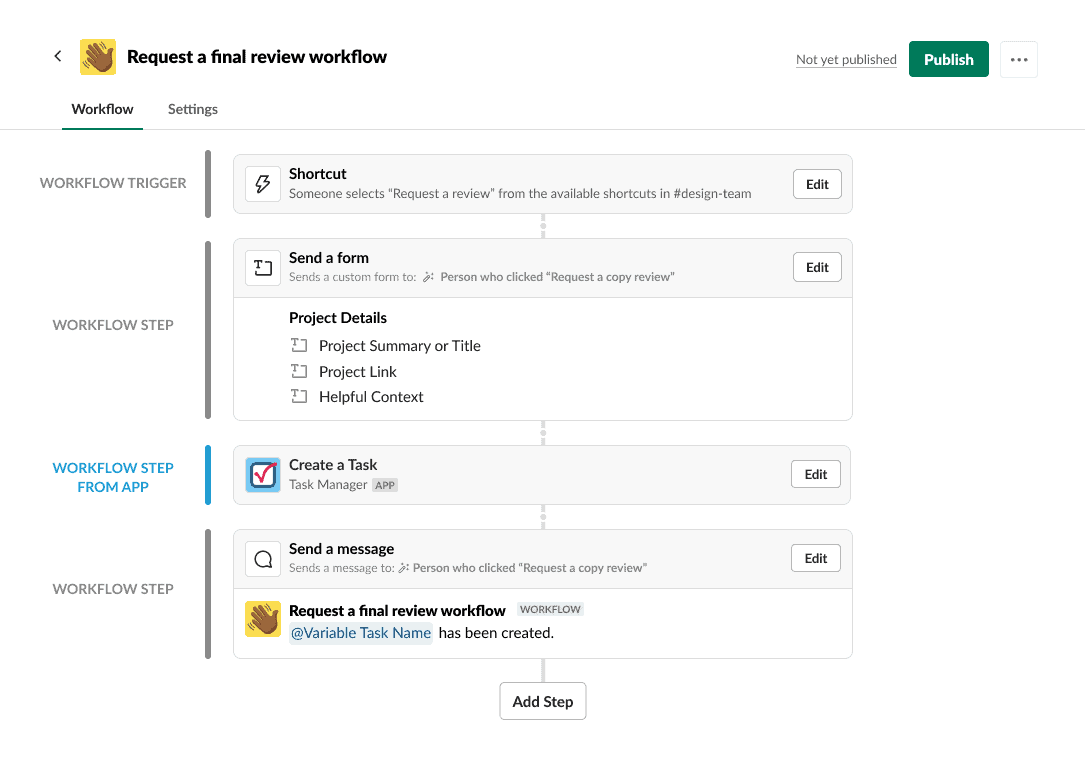
Say you’re investing in Slack for your sales team. If your sales rep receives instant alerts the moment that a high-value lead revisits a powerful product page or pricing list, your sales reps have the chance to strike while interest is at an all-time high
It’s also important to remember that Slack integrates with thousands of other external applications, and its no-code workflow builder can generate notifications from those systems directly. This is crucial if you are working across multiple platforms.
If you have an e-commerce business, sales automation could be your best friend. Workflow process automation tools like HubSpot, Pipedrive and ActiveCampaign can auto-route leads to your sales reps, trigger follow-up emails based on website actions and even help you retarget customers.
Let’s highlight HubSpot. Its Workflows tool can be used to trigger automatic actions based on customer engagement with your e-commerce site.
From sending follow-up emails for abandoned carts to updating CRM data, these automated processes save your sales team time and effort. For example, if your leads are taking hours (or days) to hear back from you, automating those follow-ups could speed up the process.
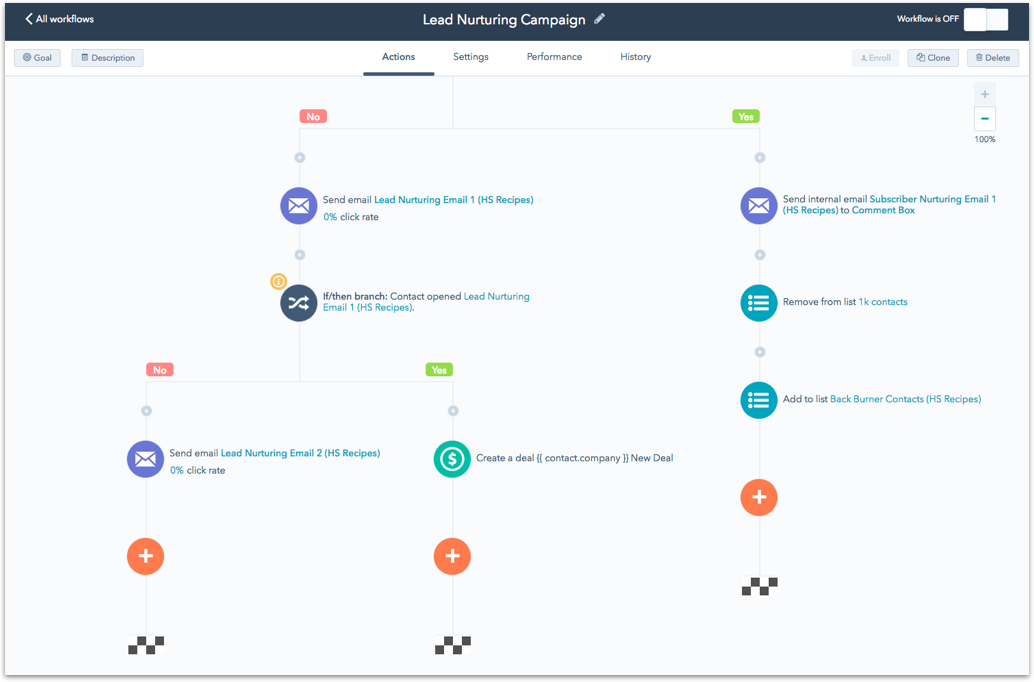
Think about it this way: if you’re a startup company juggling many clients at once, automation tools like HubSpot can automatically send nurturing emails while you focus on closing those bigger deals.
Imagine a customer browses your products or services but decides to bounce before checking out. Investing in an email sequence triggered by customer actions means your brand will automatically send a reminder email within minutes, helping you recover revenue without lifting a finger.
If you want complete control of your data and where it is stored, automating your workflows on a private server is the way to go.
For a business handling sensitive information, n8n self-hosted tools like Hostinger offer better privacy during data transfer than cloud-hosted alternatives. This is ideal if your team wants to invest in automation but can’t compromise on data control.
For example, a fintech company handling sensitive banking data can use an n8n to automatically verify its leads, update internal systems, and notify compliance teams, all without data leaving its private server.
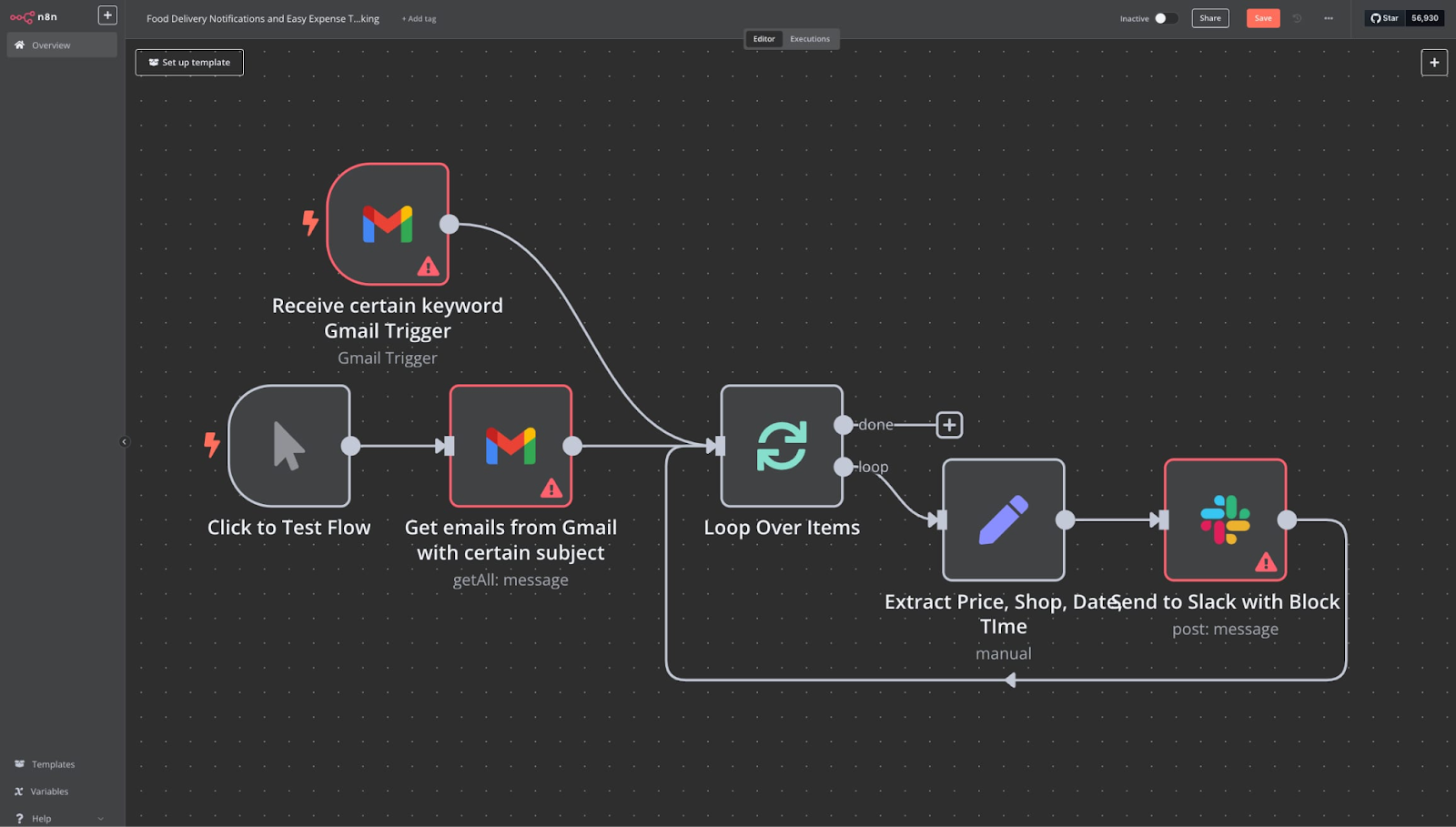
You can use n8n on Hostinger to pull leads from web forms, enrich them with additional data, update CRM records, and even trigger Slack notifications, all while maintaining data security during transfers.
Manual approvals are 100% dependent on upper management having the time and the capacity to sign off on a workflow. There’s nothing worse than capturing a lead or finishing a project, only to have to wait for it to be manually approved.
If delays caused by unavailable managers, bottlenecks in finance or legal, and your projects waiting days for a simple yes/no, investing in tools like Power Automate and Kissflow could change this.
These platforms auto-route documents, quotes, or invoices to the correct approver based on rules such as value or department. Teams immediately reduce bottlenecks.
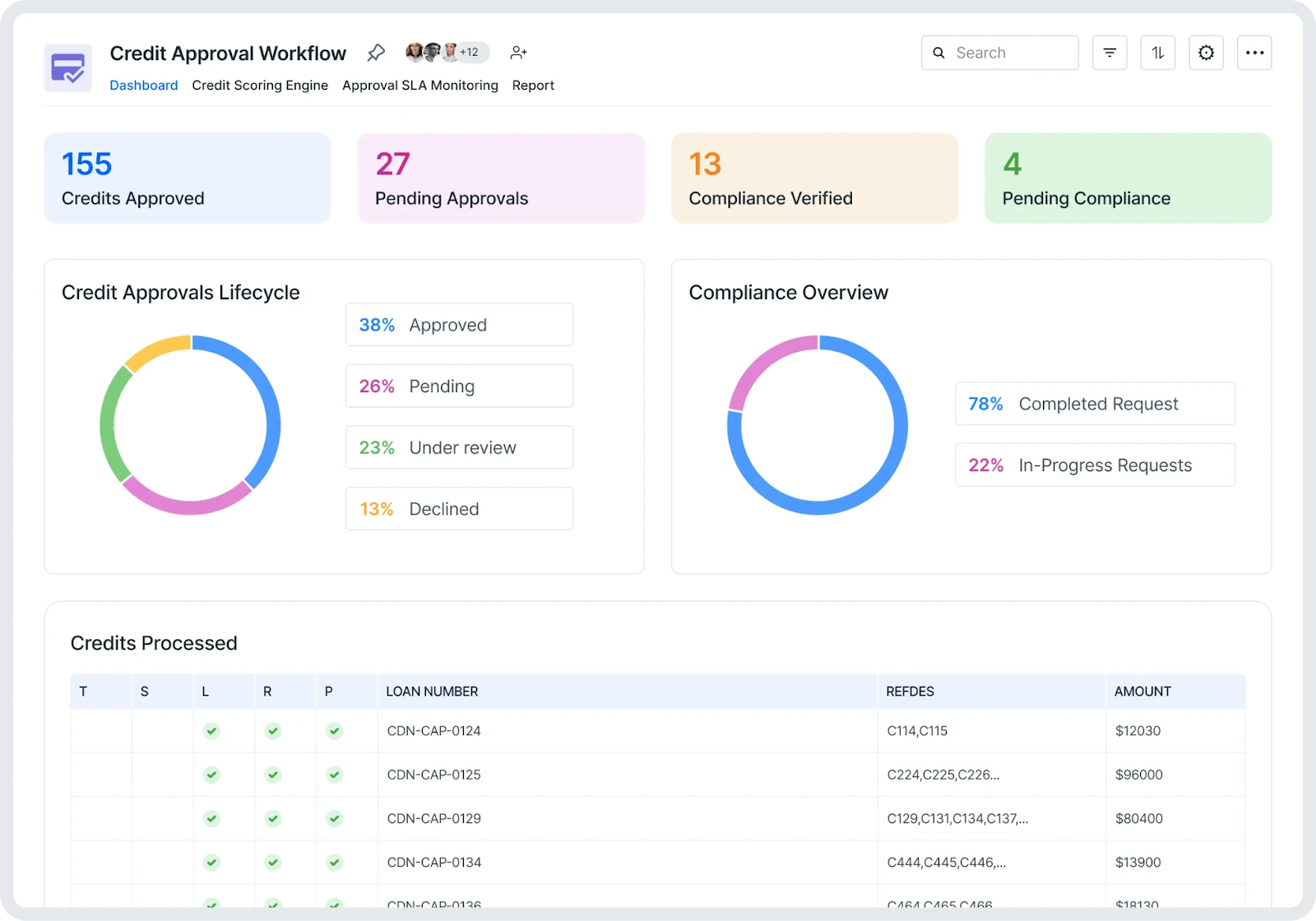
Kissflow, for example, automatically routes approval requests and, depending on the content/data it receives, can instantly create escalation paths or approve requests on the spot if the data matches its conditional logic and approval hierarchy.
This is helpful if your team is constantly being held up on smaller approvals, such as a small purchase order. With a system like Kissflow in action, minor purchases could be approved in seconds, while anything higher gets routed to the finance director for a second look.
When your team is no longer waiting days for basic decisions to be signed off on, watch how quickly your sales pipeline will move.
There’s no doubt that workflow process automation is a game-changer for modern businesses.
“Automation is no longer a luxury; it’s necessary for companies that want to grow and remain competitive,” says Michael Goshka, CEO of Planfix. “Companies can focus on strategic goals and innovation by freeing their teams from repetitive, manual work.”
In light of this, it could be time to assess your own workflows.
Start with the workflow that causes your team the most pain. If data entry errors are costing you leads, begin with automatic data syncing. If missed deadlines are the issue, implement task automation first.
The key is to start small, measure the impact, and expand from there. Workflow automation isn't about replacing your team, it's about freeing them up to do the work that actually matters.

Cindy is an Outreach Manager and SEO Specialist at ONSAAS who helps SaaS companies grow through strategic link building and SEO. Outside of work, she loves spending time in nature, especially hiking in the mountains.
.svg)
.svg)
.svg)

.svg)
%20(1).svg)
%20(3).svg)
.svg)
.svg)