Back to articles

SaaS Keyword Research: Building a Keyword Map That Drives Signups

September 11, 2026
By
Cindy Graciella

When we do keyword research for SaaS, we’re not trying to build the biggest possible list of keywords. We’re looking for the searches that can actually lead someone to a signup, demo, or purchase, then mapping each one to the right page.

We start with bottom-funnel queries because a low-volume search from someone ready to buy can be worth far more than thousands of informational visits. We also validate what we find against our own Search Console data, rather than blindly trusting third-party volume estimates.

Our process has seven steps:

  1. Seed bottom-funnel queries from competitors and Autocomplete
  2. Mine Jobs-to-be-Done language from customers
  3. Cluster keywords by search intent
  4. Score intent from the live SERP
  5. Validate demand with Search Console
  6. Add the AI-search layer
  7. Turn the final list into a keyword-to-content roadmap

The goal is to have a keyword map that tells us what to create, why it matters, and how the page should contribute to pipeline.

Why Generic Keyword Research Fails SaaS

The usual workflow is simple: export thousands of keywords, sort by volume, and start writing. We think that’s backwards.

Three things make this approach particularly weak for SaaS:

  • Keyword volume is an estimate. Niche B2B, integration, and long-tail queries are often underreported or shown as zero.
  • Not every search needs to become a blog post. AI search is taking more of the informational journey, so owning high-intent queries matters more than collecting informational traffic.
  • Buyers research independently. They often answer basic questions before they ever talk to sales, so our comparison, pricing, integration, and use-case pages need to do more of the selling.

That’s why we don’t use traffic as the main scoreboard. A page can bring in thousands of visitors from students, job seekers, or irrelevant audiences and still generate zero pipeline.

Before we research anything, we need two things: a clear ICP and a good understanding of the problems that ICP actually describes. Otherwise, every keyword looks like a potential opportunity.

The SaaS Intent Map: Keyword Pattern to Page Type

We map searches to three broad stages:

  • Problem aware: the buyer has a problem but may not know which type of software can solve it.
  • Evaluation: they know the category and are comparing solutions.
  • Decision: they’re choosing between specific products and looking for proof, pricing, or fit.

The SERP tells us what kind of page to build. If Google is showing ten comparison pages, we shouldn’t insist on creating a product page just because that’s what we want to rank.

Keyword pattern Buyer journey stage Dominant SERP page type Page type to build Conversion expectation
“[competitor] alternatives” Decision Comparison listicles, mostly from vendors and affiliate reviewers Your own alternatives listicle, with your product positioned honestly among real rivals High – the searcher is already shopping and has named a product
“[competitor A] vs [competitor B]” Decision Head-to-head comparison posts, review-site profiles, some vendor pages Single-comparison page with a feature and pricing table and a stated verdict High – naming two vendors means a shortlist exists
“[category] pricing”, “how much does [category] cost” Decision Vendor pricing pages, cost-breakdown blog posts, directory listings Cost-explainer page covering pricing models and total cost drivers, linking to your pricing page High – price questions come from people planning a purchase
“[your tool] [other tool] integration” Evaluation Vendor integration pages, marketplace and app-directory listings, docs Dedicated integration landing page plus setup docs High – the searcher named your product and their stack
“[category] software for [industry or role]” Evaluation Mixed: vendor use-case landing pages and roundup listicles Use-case or industry landing page built for that segment’s workflow and objections Moderate to high – qualified by segment, but still comparing options
“[job] template”, “free [job] checklist” Problem aware Blog posts with embedded downloads, template galleries Free template gated lightly or ungated, with the product as the upgrade path Low per visit, but strong list-building and retargeting value
“how to [job to be done]”, “why does [problem] happen” Problem aware Educational blog posts and guides, occasional docs pages Practical how-to article that solves the problem manually, then shows where software removes the manual part Low – treat as assisted conversion, not direct

Rate the last column high only when the searcher is naming a product, a price, or a competitor because everything else is a longer game. You’ll come back to this table when you cluster, when you score intent, and when you fill in the roadmap.

The Seven-Step SaaS Keyword Research Process

The first three steps help us build the list. The next three qualify it. The final step turns what survives into something the content team can actually use.

Keep everything in one spreadsheet from the start. Add columns as we go instead of creating a new sheet for every stage.

One rule matters throughout the process: we don’t throw away a keyword just because a tool says its volume is low. We qualify it first.

Step 1: Seed the List Bottom-Funnel From Competitors and Autocomplete

Start with your competitors’ rankings and Google’s own suggestion data, where buyer-ready queries already exist. Work the intent map patterns first, including alternatives, versus, pricing, integration, use case, and template, and ignore the category head term entirely for now.

  1. Mine each direct competitor. In Ahrefs or Semrush, open the competitor’s domain, go to Organic keywords, and sort by traffic value rather than traffic volume. Traffic value surfaces the commercial terms; traffic volume surfaces their top-funnel blog. Then open Top pages and note which URLs are comparison, pricing, integration, or use-case pages, and pull the keywords each one ranks for.
  2. Screen the export against your ICP. Delete every term that serves a different company size, region, or buyer. An export full of “free [category] for students” is not a plan when you sell to 200-seat finance teams.
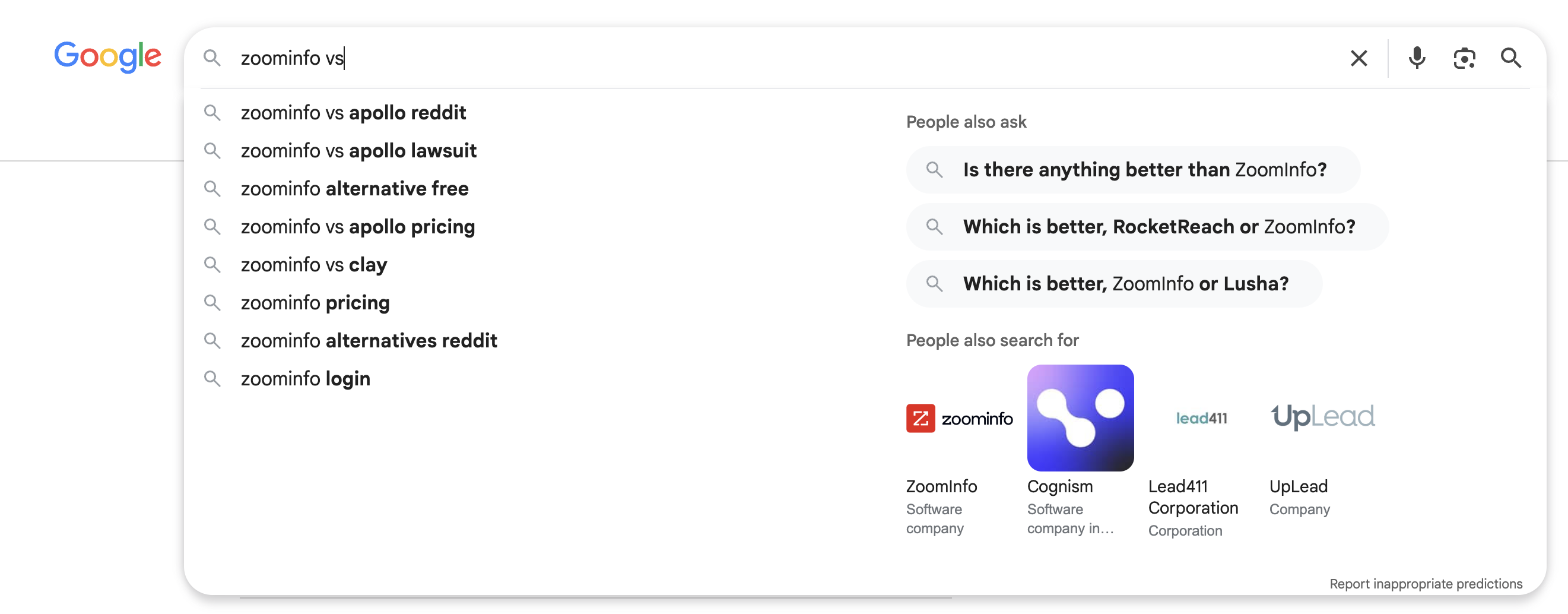
  3. Expand each survivor in Autocomplete. Type the seed, then cycle the alphabet after it, and harvest the modifiers that keep appearing: “for”, “vs”, “pricing”, “free”, “integration”, “without”. Scrape the related searches block at the bottom of the SERP too.

For a worked example, consider a competitor’s pricing page that ranks for “[competitor] vs”.
saas keyword research

Feed that one URL through the sequence and you get more seeds: “[competitor] vs [other tool]”, “[competitor] pricing”, “[competitor] alternatives”.

Step 2: Mine Jobs-to-be-Done Language, Not Feature Names

Your feature names came from your product team. The phrases buyers search came from their own frustration, and the two almost never match, so this step collects the second set.

Where to look, and what to take from each:

  • Sales call notes and recordings. Copy the sentence immediately after “we tried to” and after “the problem is”. That’s the job, stated in the buyer’s words.
  • Support tickets. Take the subject lines, not the bodies. Subject lines are what someone types when they’re annoyed and in a hurry, which is exactly the register of a search query.
  • Onboarding surveys. Pull the free-text answer to “what were you doing before this?”
  • Review sites. Read your own profile and your competitors’. The “cons” sections are a list of pains people go looking for alternatives about.
  • Communities and forums. Find threads where someone asks for a recommendation, and copy the constraint they state before the ask.

Paste every verbatim into a phrase bank tab with the source and the speaker’s role. A controller and an AP clerk describe the same broken process in different words, and only one of them is your ICP, so role matters.

Then convert the phrases by putting feature language on the left and buyer language on the right:

Feature name we use Phrase the buyer uses
Automated invoice reconciliation “stop chasing unpaid invoices”
Role-based access controls “keep contractors out of payroll data”
Multi-entity consolidation “close the books for three companies at once”
Real-time pipeline visibility “know which deals are actually going to close”
Usage-based billing engine “bill customers for what they actually used”

Run each right-hand phrase through your keyword tool and Autocomplete to find the searched variant. Some will have no demand at all. Mark those “copy only” – they become headlines and first paragraphs on pages targeting the searched variant, never page targets themselves.

Step 3: Cluster the List and Enforce One Intent Per URL

Use one URL for each cluster, with every grouping decision based on the results page rather than wording alone:

  1. Merge queries that return largely the same top ten. “invoice reconciliation software” and “automated invoice matching tools” usually share seven or eight of ten results, which means Google treats them as one need. Pick the clearer phrase as the primary term and demote the other to a supporting keyword.
  2. Split queries that return different dominant page types. “billing software pricing” pulls cost-explainer content, while “[your product] pricing” pulls vendor pricing pages. Nearly identical wording can require two different pages.
  3. Name and flatten each cluster. Name it after its primary term and list the supporting queries beneath it, one row per cluster. Nested cluster hierarchies look impressive but get abandoned by week three.
  4. Check for cannibalization. Search site:yourdomain.com "primary term" to identify existing pages. If two URLs target the same intent, consolidate them, redirect the weaker one, or re-scope one to a different intent from the map. Then filter the Search Console Performance report to a single query, switch to the Pages tab, and inspect the date range month by month. If two URLs trade positions for that query across consecutive months, Google cannot tell which one you meant to rank, even when the site: search looked fine.

Step 4: Score Intent From SERP Evidence

Label every cluster transactional, comparison, or problem-aware from what the live SERP actually shows. Open the primary term in a clean browser session while logged out and incognito, with the location set to your main market. Before you decide, record which page types hold the top ten, what commercial signals appear, how the query itself is phrased, and whether any answer box or AI summary has already absorbed the question.

Intent label Page types ranking in top 10 Commercial signals (ads, product listings, review widgets) Query phrasing markers
Transactional Vendor product, pricing, and integration pages; app-marketplace listings; occasional docs Multiple paid ads above the fold, vendor sitelinks, review-star widgets on vendor results Brand names, “pricing”, “cost”, “free trial”, “demo”, “login”, integration pairings
Comparison Comparison listicles, head-to-head posts, review-site profiles like G2 and Capterra Ads from named competitors bidding on each other, directory and review aggregators high in the ten “vs”, “alternatives”, “best”, “top”, “comparison”, “which is better”
Problem aware Educational blog posts, guides, template downloads, forum threads Few or no commercial ads, more featured snippets and People Also Ask, video results “how to”, “why does”, “what is”, “template”, “checklist”, “example”

Tie-breaker: when the top ten mixes page types, follow the majority of the top five. The single number-one result is often an outlier that ranks on brand strength rather than on intent match.

For a worked example, take “best CRM for small business.” If most of the top five results are roundup articles comparing multiple CRMs, the query has commercial investigation intent, even if one vendor's product page ranks first. We would build a use-case or comparison listicle rather than a standalone product page. The important signal is the dominant page type, not the format of the number-one result.
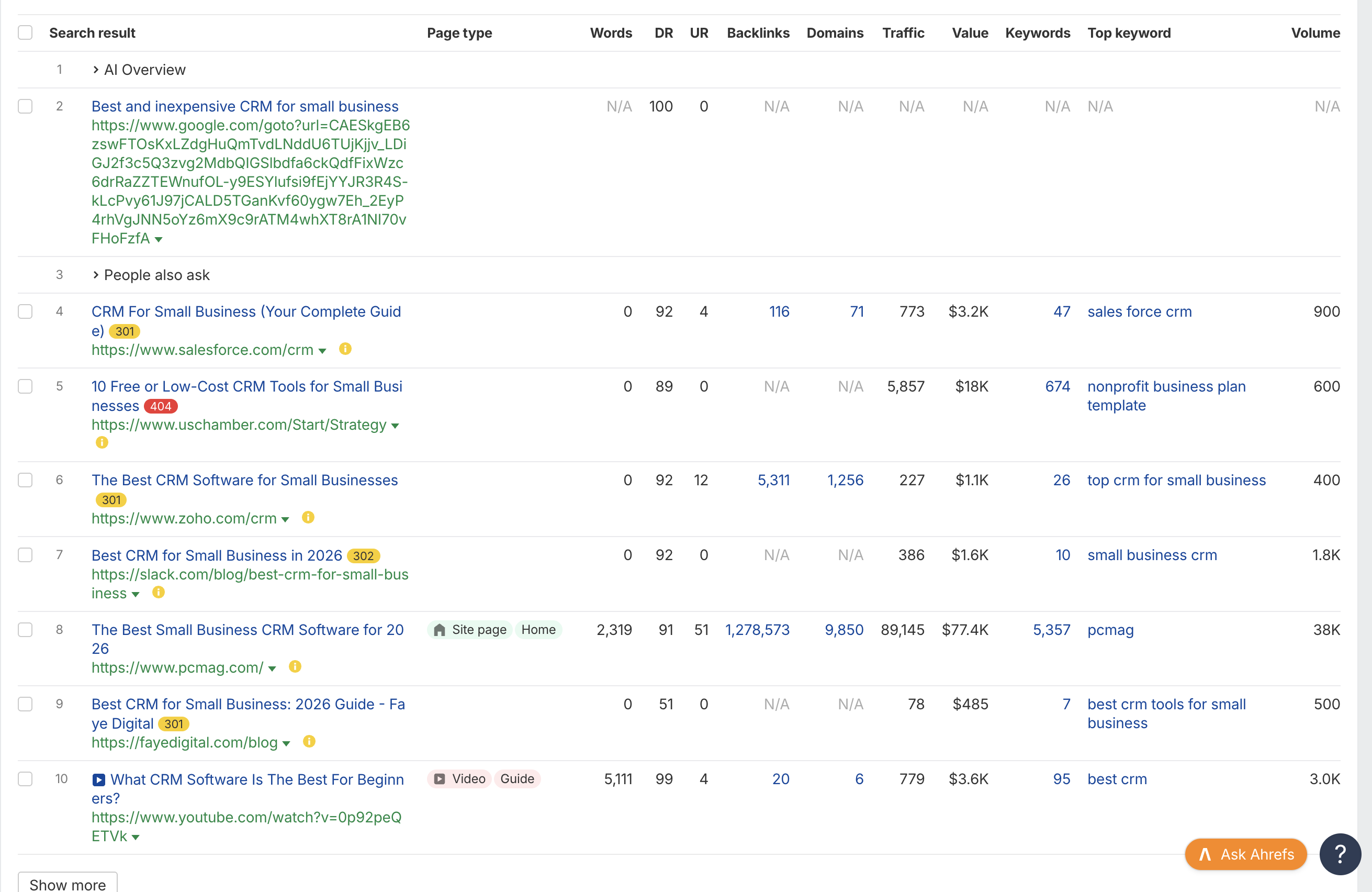
Flag any cluster where the label contradicts the page you intended. That mismatch is a decision point, not a detail: re-scope the page to match the SERP, or drop the cluster.

Step 5: Validate Tool Volume Against Search Console

Check every shortlisted cluster against your own impression data, but validate line by line only when the query appears in the export. Mark absent queries as unverified rather than treating their impressions as near zero. This step also recovers buyer-ready queries the volume filter threw away.

  1. Pull the data. Search Console, Performance report, Search results. Set the date range to the last 12 months, open the Queries tab, and export to Sheets.
  2. Filter by pattern. In the export, filter the query column for your pattern words: vs, alternative, pricing, integration, for, plus your competitor names and product name. This collapses thousands of rows into the few hundred that matter.
  3. Compare present queries line by line. Put tool volume next to your impressions for each query found in the export. When the two disagree badly, believe your own data.

Handle the three possible outcomes this way:

  • The query is absent from the export. Keep it as a candidate, but mark the volume figure as unverified because Search Console only reports queries where your site appears.
  • Tool volume is zero or low, but impressions are real. Rescue it because people are searching this and Google is already showing you. This is the single highest-yield output of the step, where the “low-volume keywords out-earn high-volume ones” claim stops being a slogan.
  • Tool volume and measured impressions are both near zero. Park it, and revisit only if sales starts hearing the phrasing.

Two more passes worth running on the same export. Sort by average position and pull everything between 8 and 25: a page already surfacing needs a refresh and some internal links, not a net-new brief, so it ships faster than anything on the new-page list. Then sort by impressions and find rows with hundreds of impressions and almost no clicks. That’s an intent mismatch, not a title-tag problem. Go re-read the SERP page type for that cluster.

Step 6: Add the AI-Search Layer

Layer prompt-style queries onto the clusters you’ve already qualified rather than researching them as a separate project. Google has disclosed that 15% of daily searches are queries it has never processed before, which works out to roughly 2.1 billion brand-new queries a day, phrasings no keyword database can report because they’ve never been typed until now. You cannot research your way to those individually. You can cover their shape.

  1. Convert each primary term into three prompt forms. A question (“what is the best way to reconcile invoices across two entities”), a qualified recommendation request (“best billing software for a 20-person finance team”), and a direct comparison (“is Stripe Billing or Chargebee better for usage-based pricing”).
  2. Add constraint qualifiers. Role, team size, industry, and existing stack. People type constraints into assistants that they’d never type into a search box, because the assistant can handle them.
  3. Mine your own sources. Your sales team’s most-asked qualifying questions are prompt forms already. So are the questions in your own assistant transcripts if anyone on the team logs them.

Record all of this in an extra column on the existing cluster rows. A second keyword list is a second thing to maintain and a second thing to abandon.

Then format the target pages to be quotable. Under each heading, open with a direct one-paragraph answer before any setup. Include a plain definition sentence for the core concept. Put comparisons in a table rather than in flowing prose. Name specific constraints, such as “for teams billing more than 500 customers monthly”, because vague claims don’t survive summarization.

Step 7: Ship the Keyword-to-Content Roadmap

The deliverable is one sheet a writer or contractor can open on Monday and start from, with twelve columns:

Column What goes in it
Cluster name The primary term, used as the cluster’s ID everywhere else
Primary keyword Exact phrasing you’re targeting in the title and H1
Supporting keywords The merged near-duplicates from step three, comma separated
Intent label Transactional, comparison, or problem-aware, from step four
Page type to build Pulled from the intent map, not from preference
Funnel stage Decision, evaluation, or problem aware
Priority order Rank among surviving clusters, set by the five prioritization tie-breakers
Existing URL or new Paste any URL found through the step-three site search or Search Console checks; use “new” only when neither finds a page
Internal links to add Which existing pages should link to this one, by URL
Owner A person’s name, not a team
Target publish date A date, not a quarter
Success metric The conversion event this page is accountable for

Two columns get filled in wrong almost every time. Priority order is not a gut call or a volume sort. It comes from the five tie-breakers below. Success metric must be a conversion event, such as trial starts from this page, demo requests, or template downloads that enter the nurture sequence. “Rank top 5” and “2,000 sessions” are diagnostics that explain a conversion number after the fact, not success metrics.

Sort the finished sheet by funnel stage, descending from decision. The bottom-funnel pages get built first even though they’re the least fun to write.

Prioritizing: Which Keywords Actually Get a Page

Once we have the qualified clusters, we score them on four things:

  • Intent clarity: Does the SERP clearly show what the searcher wants?
  • ICP fit: Is this actually our buyer?
  • Page-type capability: Can we build the type of page Google expects, with enough product depth, data, or proof?
  • Winnability: Do we have a realistic chance of ranking this quarter?

If a cluster fails any one of these, it doesn't make the priority list, regardless of its volume.

When two candidates compete for the same slot, we use this order:

  1. Clearer intent wins. Mixed SERPs usually mean more work and less certainty.
  2. The page type we can build well wins. There's no point targeting a comparison query if we can't create a credible comparison.
  3. ICP language wins. We'd rather target a smaller query from our actual buyer than a larger one from an adjacent audience.
  4. The more winnable SERP wins. Look for at least two results from sites at or below our authority.
  5. Still tied? Choose the query closer to the signup — not the one with more volume.

The Low-Volume Keyword Qualification Test

We don't automatically reject a keyword because a tool reports zero volume. A low-volume query deserves its own page when:

  • It describes our ICP's problem, a competitor, an integration, or a pricing question.
  • It maps cleanly to one page type.
  • The page has a clear conversion path.
  • We've heard the phrasing from an actual customer, prospect, sales rep, or support conversation.

If it fails one condition but already shows impressions in Search Console, we may cover it as a section of a larger page instead.

The point is that buyer-ready low-volume queries can be more valuable than high-volume informational terms. There is no magic volume threshold that makes a keyword worth targeting.

Reading SERP Difficulty Instead of Trusting KD

Keyword Difficulty tells us how competitive the backlink profiles of ranking pages are. It doesn't tell us whether the SERP is actually winnable.

We spend a couple of minutes checking:

  • Who ranks? Vendors, publishers, directories, or a mix?
  • Are aggregators dominating? Look for G2, Capterra, marketplaces, and affiliate listicles.
  • Does anything our size rank? If every result comes from a much stronger domain, that's a warning.
  • How good is the ranking content? Check positions four through eight for depth, freshness, screenshots, and usefulness.
  • How commercial is the SERP? Multiple ads can push organic results well below the fold.

A SERP dominated by strong aggregators may be difficult to win and less valuable even if we do. But if a thin or outdated competitor page sits in the top five, that's an opening.

The exception is branded and competitor-name queries. If someone searches “[your product] vs [competitor]” and we don't have a page, the opportunity can be worth pursuing even when the traditional difficulty score looks high.

The Tool Stack, Honestly

The stack needs three roles rather than a shortlist, with one discovery tool for finding queries you have no presence for, one free query source for live phrasing, and your own first-party data for validation. You need one paid tool, not two – Ahrefs and Semrush overlap heavily for this workflow, and running both mostly buys you two modeled volume estimates that disagree.

Steps four, five, and seven require no paid tool at all. Intent scoring happens in a browser. Validation happens in Search Console. The roadmap is a spreadsheet. Most of the judgment in this process is free; the paid tool mainly saves you time on step one.
1. Ahrefs

Ahrefs earns its place in this workflow almost entirely on competitor mining. The Organic keywords report sorted by traffic value is the fastest way to see which commercial terms a rival actually monetizes, and Top pages tells you which of their pages carry the business rather than the blog.

Its SERP overview is the other reason to keep it open during steps one and four – you can see who ranks, with what kind of page, without opening ten tabs. Treat that as a shortlist for manual inspection rather than a substitute for it.

Key features:

  • Competitor Organic keywords report, sortable by traffic value for bottom-funnel mining
  • Top pages report for identifying which competitor page types are working
  • SERP overview for checking who currently ranks on a given query
  • Keyword ideas expansion from a single seed term

Pricing: Starter plan at $29/mo.

Best for: Teams that want one tool covering competitor mining and SERP inspection through the list-building steps.
2. Semrush

semrush

Semrush makes more sense when keyword work sits inside a wider competitive and paid program. Keyword Gap comparing several competitors simultaneously is genuinely faster than running each rival separately, and Keyword Magic expands a seed into pattern variants such as “for”, “vs”, and “pricing” in bulk rather than one Autocomplete query at a time.

Position tracking matters after the roadmap ships. Grouping tracked keywords by cluster gives you movement data at the cluster level, which is the unit you actually manage.

Key features:

  • Keyword Gap analysis against multiple competitors at once
  • Keyword Magic tool for expanding seeds into pattern variants at scale
  • Position tracking with cluster-level tagging once pages are live
  • Shared workspace with paid and competitive reporting

Pricing: SEO Toolkit Guru tier at $249.95/month; Semrush One Starter tier at $199.00/mo.

Best for: Larger marketing teams already running competitive and paid reporting who want keyword research in the same place.
3. Google Search Console

Search Console is the only tool here that reports measured reality rather than an estimate, which makes it the referee for every figure the paid tools produce. When Ahrefs says 0 and Search Console shows 340 impressions over twelve months, Search Console is right.

It also answers two questions no third-party tool can. Which of your pages are stuck at position 9 for a query you care about, and which two of your URLs are fighting each other for the same one. Both are in the Performance report’s Pages tab, filtered to a single query.

Key features:

  • Actual queries that produced impressions and clicks on your domain
  • Average position data for finding clusters parked on page two
  • Page-level query breakdowns for diagnosing cannibalization
  • 16-month history, exportable to Sheets or Looker Studio

Best for: Every SaaS team, as the step-five check before any page gets committed to the roadmap.

4. Google Autocomplete

Autocomplete is a live list of phrasings real people type, and it’s the only source here that costs nothing and lags nothing. New product names, fresh integrations, and this month’s competitor rebrand show up in suggestions long before they appear in a keyword database. Its real value is modifier discovery. Type your category, cycle the alphabet, and the “for”, “vs”, “pricing”, and “integration” patterns announce themselves, matching the bottom-funnel shape the intent map is built around.

Key features:

  • Surfaces modifier patterns including “for”, “vs”, “pricing”, “free”, and “integration”
  • Reveals long-tail and question phrasings that tool databases round away
  • Works instantly on any seed, including brand-new product and competitor names
  • Related searches block at the bottom of the SERP extends the same source

Best for: Seeding and expanding the list in step one, and for teams with no tool budget at all.

Have questions

What is SaaS SEO, and how does it differ from keyword research?

SaaS SEO is the whole program covering technical health, content, links, and conversion paths aimed at trials and demos. Keyword research is one input to it – deciding which queries deserve pages. The SaaS-specific part is that the target is a product signup rather than an ad impression, so bottom-funnel pages outrank blog volume in priority.

What does keyword research mean in plain SEO terms?

Finding the words people type into a search engine, then judging which of them are worth building a page for. The judging half is where most of the value sits, and where most workflows spend the least time.

What is the 80/20 rule in SEO, and does it hold for SaaS?

The idea that a small share of pages drives most of the results. In SaaS it holds harder than average, but the 20% is rarely your highest-traffic pages – it’s usually a handful of comparison, pricing, and integration pages that each pull modest traffic and convert at several times your blog’s rate.

How many keywords should a new SaaS site start with?

Three to five clusters, not three hundred keywords. That’s roughly one alternatives page, one or two integration pages, and one use-case page – enough to test whether search produces qualified signups before you commit a content budget.

Should we target our own brand name and product name as keywords?

Yes. Target the modified versions, including “[product] pricing”, “[product] reviews”, “[product] vs [competitor]”, and “[product] alternatives”. If you don’t own those, review sites and competitors will, and they’ll frame the answer.

How long does it take for a new SaaS cluster to produce signups?

Plan on three to six months for a new domain, faster for pages rescued from positions 8-25 since they’re already indexed and ranking. Decision-stage pages convert sooner than problem-aware ones, which is another reason to build them first.

By clicking “Accept All Cookies”, you agree to the storing of cookies on your device to enhance site navigation, analyze site usage, and assist in our marketing efforts. View our Privacy Policy for more information.

Cindy Graciella

Cindy is an Outreach Manager and SEO Specialist at ONSAAS who helps SaaS companies grow through strategic link building and SEO. Outside of work, she loves spending time in nature, especially hiking in the mountains.

On this page:

No items found.

Related Articles

By clicking “Accept”, you agree to the storing of cookies on your device to enhance site navigation, analyze site usage, and assist in our marketing efforts. View our Privacy Policy for more information.