
.svg)
%20(1).svg)
%20(3).svg)
Back to articles
6 Secrets to Effortlessly Manage Multiple Social Media Accounts
June 25, 2026
By
Irina Maltseva
If you have ever posted from the wrong account or missed a client comment because it was buried in a tab you forgot to check, you are not alone.
Learning how to manage multiple social media accounts is something most people figure out the hard way, through mistakes, missed posts, and the slow realization that working faster is not the same as working smarter.
Two accounts is manageable. Five needs a process. Ten requires infrastructure. This guide gives you exactly that: workflow design, scheduling, analytics, security, and the mental overhead nobody talks about enough.
TL;DR
1. Simplify access with a multi-login tool: run multiple accounts simultaneously without the constant log-in/log-out chaos.
2. Streamline your workflow: templates, content batching, repurposing, and scheduling to save hours every week
3. Centralize analytics and reporting: track performance across all accounts from one place without drowning in data
4. Keep accounts secure without losing speed: 2FA, password managers, and isolated sessions to protect accounts at scale
5. Lower the mental load: reduce cognitive overhead with systems that run without constant attention
6. Scale without burning out: add platforms and team members gradually, with clear roles and stable workflows.
The most immediate friction in managing multiple accounts is the login problem. Most people start by keeping several browser tabs open or alternating between incognito windows. It works until it does not. Platforms flag unusual login patterns, sessions expire mid-workflow, and one wrong click can publish something to the wrong account in front of the wrong audience.
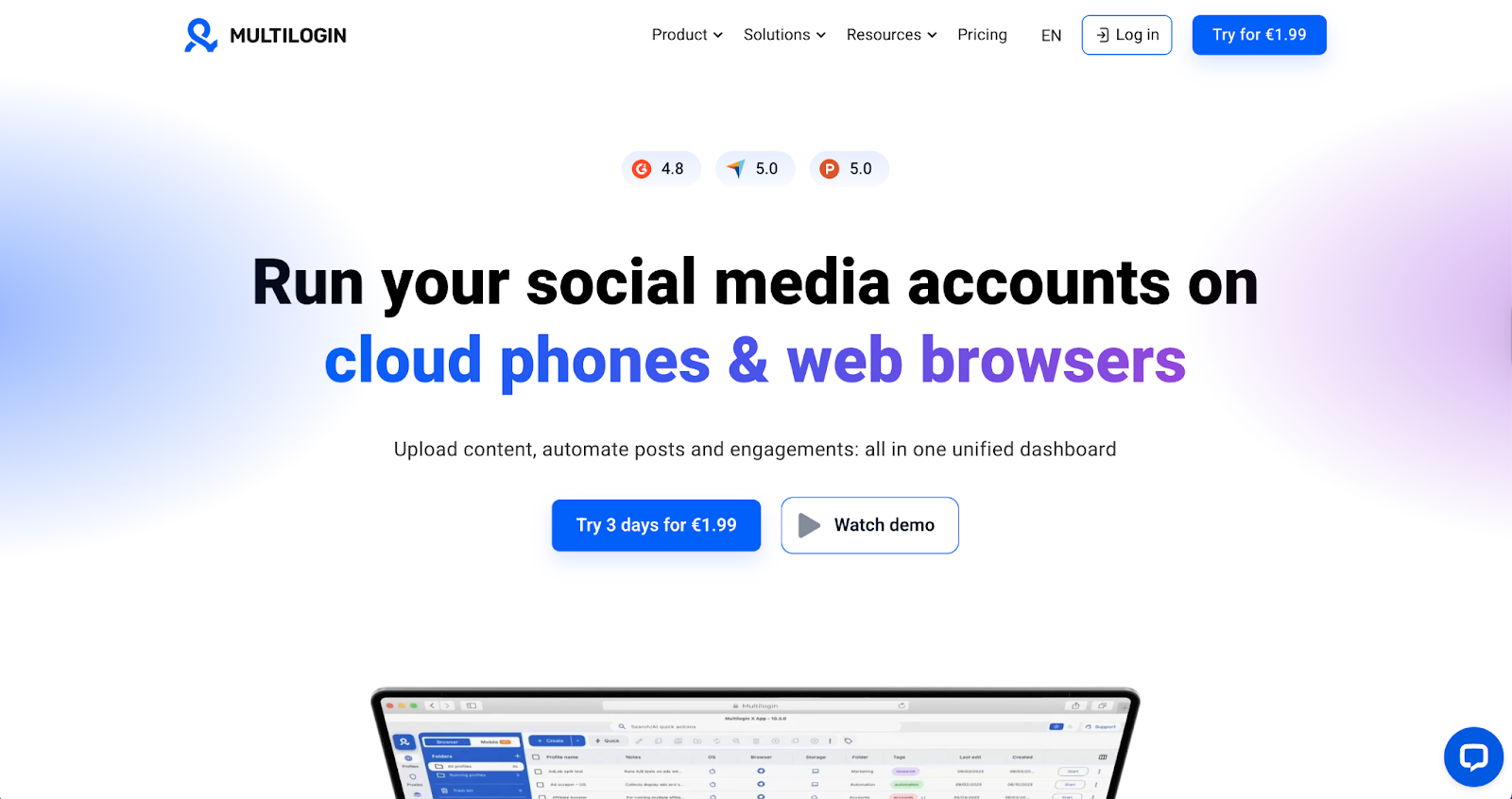
Multilogin is the most robust option for professional social media management. The tool provides cloud phones — real Android devices running in the cloud, each assigned its own unique device identifier, dedicated login data, and a fully isolated app environment. When you access TikTok or Instagram through a cloud phone, the platform registers it as a completely independent device, not a shared session. Browser profiles work the same way for web-based accounts, with every profile carrying a distinct digital fingerprint of its own.
For agencies managing client accounts at scale, this means cleaner account isolation, no session conflicts, and a setup that mirrors how real users actually access social platforms.
If you are looking for alternatives, GeeLark and Vmoscloud offer similar cloud device-based approaches to account management and are worth considering depending on your team size and platform mix.
The workflow benefit is straightforward. Instead of logging in and out, you run three cloud phones simultaneously, each operating as its own independent mobile device:
No cross-contamination, no suspicious login triggers, no accidental wrong-account posts. For anyone managing more than two or three accounts professionally, this kind of setup recovers time every week and removes an entire category of mistakes.
Getting into your accounts without friction is step one. But access alone does not make you productive; it just removes one obstacle. The bigger one is what you do once you are in.
Without a repeatable system, you are making the same decisions over and over and doing it slightly differently each time. That inconsistency is what creates the drift: inconsistent posting, inconsistent tone, inconsistent results.
Build templates first. Tools like Canva and Figma let you create branded templates for every format you use regularly: carousels, story slides, quote graphics, and video thumbnails. Once templates exist, producing a new post takes minutes. More importantly, your visual identity stays consistent across accounts without anyone having to think about it.
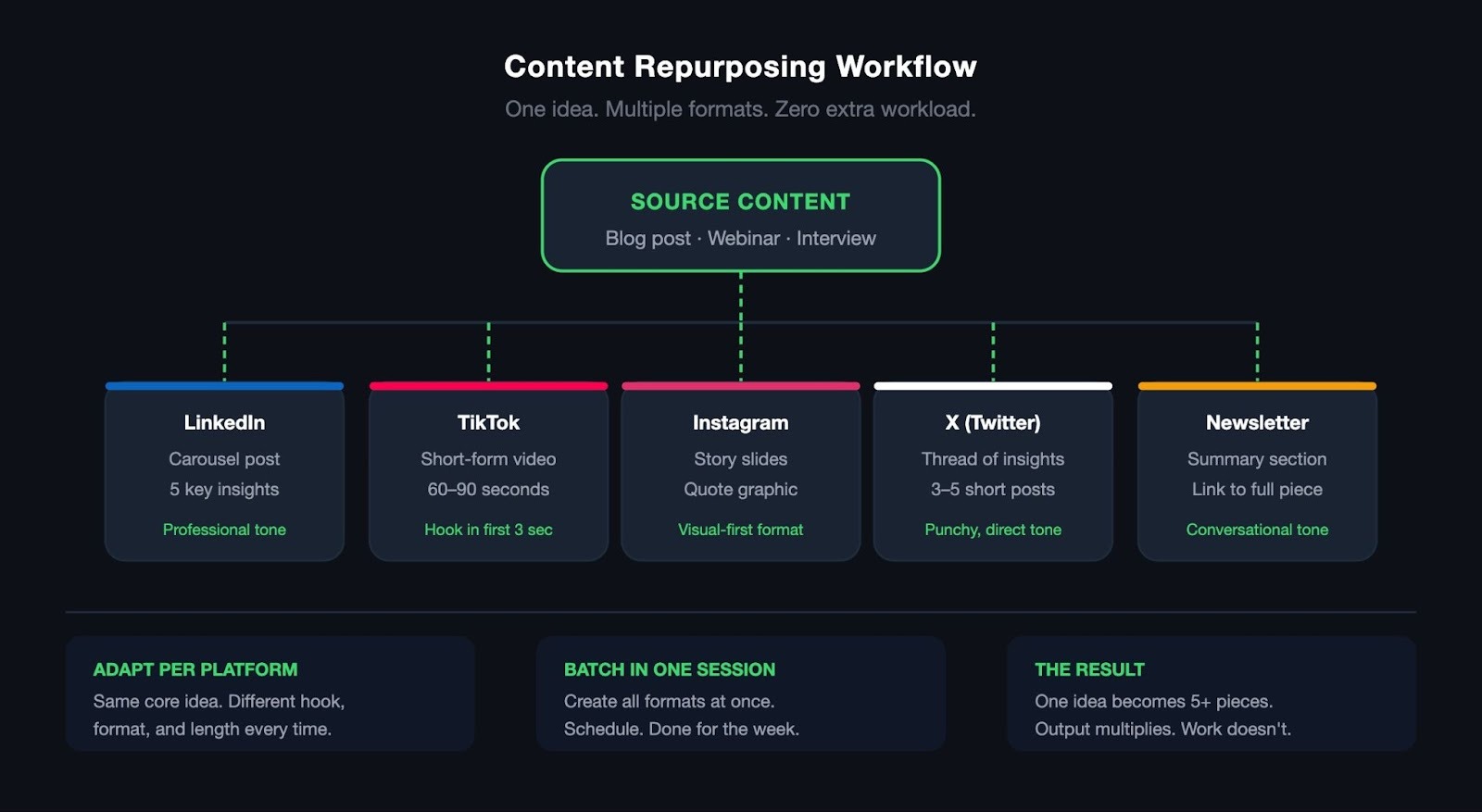
Then, repurpose content across platforms. A single piece of content can live in multiple formats without feeling recycled. For example:
The key is adapting slightly per platform: same core idea, different hook, different format, different length.
The teams I have seen get this wrong were creating content from scratch every single time. But once you build the repurposing habit, your output effectively multiplies without your workload doing the same.
Finally, batch your creation sessions and schedule everything you can. Instead of producing content daily, block two or three focused sessions per week to create everything in advance.
Then, use tools like Buffer, Later, and Hootsuite to plan weeks ahead. Just note that what scheduling tools do not handle is account isolation. Platforms can still detect that multiple accounts are being managed from the same device.
That is where Multilogin fills a different gap: its cloud phones mean each account runs on what appears to the platform to be a completely separate mobile device, so your scheduling workflow runs without triggering platform flags.
Add a content calendar on top, and you move from reactive posting to deliberate publishing and recover time that goes back into strategy rather than execution.
Publishing consistently is the baseline. The teams that actually grow are the ones who know, with precision, what is working and where, and adjust before a bad month becomes a bad quarter. Without that visibility, you are optimizing by instinct, which is slow and often wrong.
The challenge with multiple accounts is that each platform serves up its own native analytics in its own format. Checking them individually is time-consuming. Comparing them meaningfully is nearly impossible. The fix is pulling everything into one place.
Most scheduling tools include built-in cross-platform reporting that handles this reasonably well. If you want more depth, dedicated analytics platforms give you more flexibility:
Once your data is centralized, the real value is in the comparisons: which content type drives customer engagement, where follower growth is actually happening, which platform deserves more of your time and budget.
When a metric dips, you want to be able to see it quickly and trace it back to a specific change: a drop in posting frequency, a format that stopped performing, an algorithm shift. That is only possible when your data is in one place and reviewed consistently.
To avoid turning analytics into a second job, track three to five metrics per platform maximum. A useful starting set:
Review weekly. Do a deeper trend analysis monthly. That cadence is enough to stay informed and make good decisions without the data work consuming the time it was supposed to save.
Most social media compromises do not happen through sophisticated hacks. They happen through shared passwords, stale permissions, and session data nobody thought to clean up. A few consistent habits close most of those gaps.
Start with role-based permissions and give people access only to what their job requires. From there, enable two-factor authentication on every account and pair it with a password manager like 1Password, Dashlane, or Bitwarden.
One layer most teams skip is isolated browser sessions. When each account runs on its own cloud phone through a tool like Multilogin, GeeLark, or Vmoscloud, a compromised session on one device cannot affect another, and platforms are far less likely to flag suspicious activity.
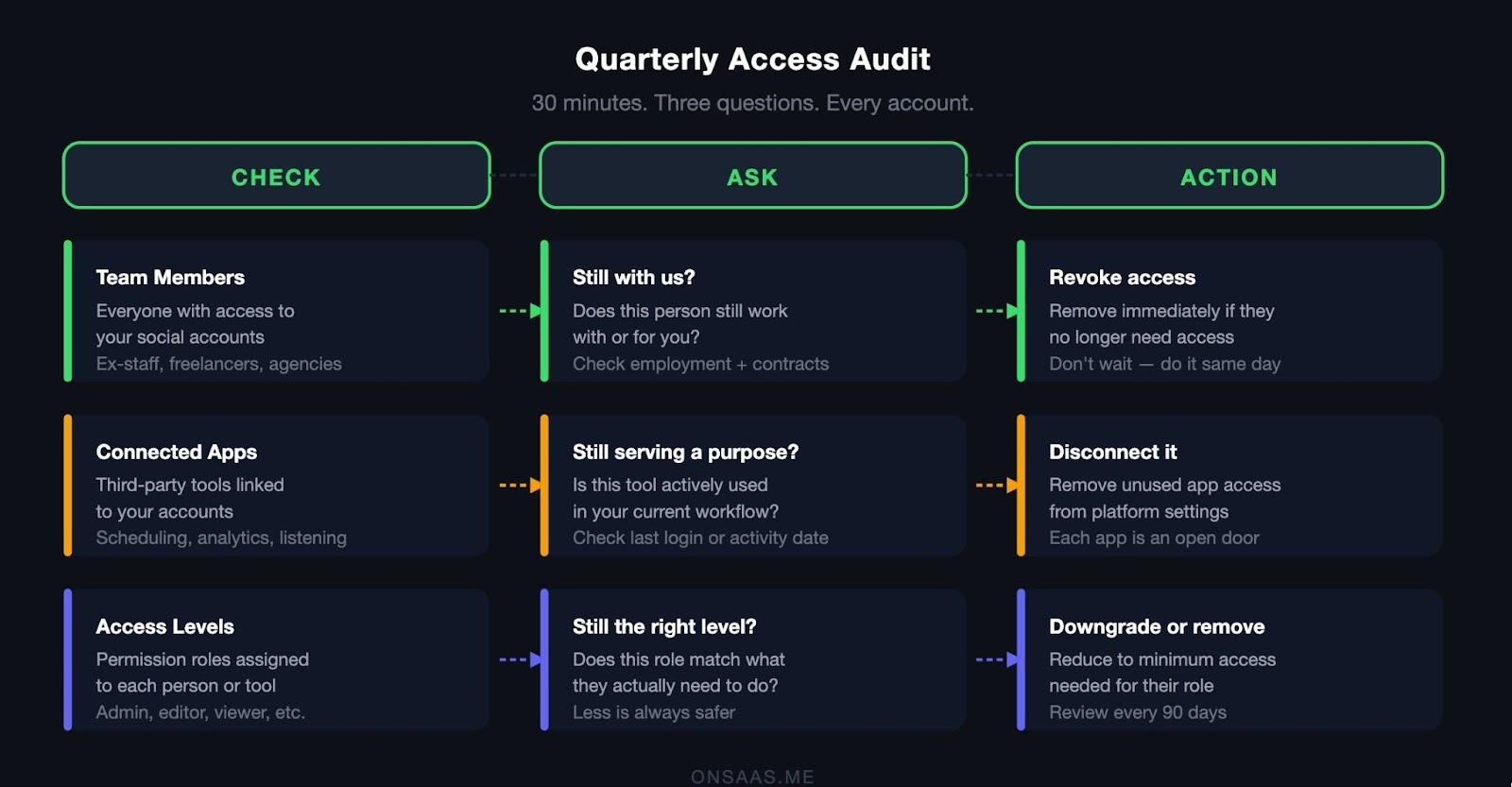
Finally, review access quarterly. A quarterly audit does not have to be complicated. Block thirty minutes, open your connected apps list on each platform, and ask three questions for every entry: does this person still work with us, does this app still serve a purpose, and does this access level still match the role? A typical audit for a five-account operation might turn up:
Remove former team members, lapsed agency connections, and third-party apps you no longer use. Most compromises arrive through a door that should have been closed months ago.
You can have the cleanest workflow and the tightest security setup, and still find yourself exhausted by Tuesday. That is the part of multi-account management nobody puts in the job description. The cognitive overhead of managing multiple accounts is genuinely exhausting in a way that is easy to underestimate until it catches up with you.
It is not just about volume. It is the constant context-switching: different platforms, different tones, different audiences, different content formats, all demanding your attention simultaneously. Burnout in this role rarely arrives as a single breaking point. It builds gradually, as missed details, slower response times, slightly off-brand captions, and a growing sense that you are always behind. By the time it is obvious, it has already been affecting your work for weeks.
A 2024 Metricool survey puts numbers to what most social media managers already feel: 75% say they are wearing too many hats at once, 73% work outside their contracted hours, and 44% cannot fully disconnect after work.
I have watched talented social media managers leave jobs they were good at because the system they were handling was quietly grinding them down. It wasn’t a resilience problem. It was a workflow problem dressed up as one.
The structural fixes that actually help:
The goal is a system that runs mostly without you, one you maintain and steer, rather than one that demands constant input. That shift, from reactive to systematic, is what separates people who manage ten accounts sustainably from people who burn out at three.
Systems give you capacity. Sequencing determines whether you use it well. Most people get the first part right and rush the second. And the pressure to scale is only increasing — the social media management market was valued at $19.1 billion in 2023 and is forecast to hit $112.6 billion by 2032, growing at 22.4% annually.
The mistake most people make is expanding too fast, adding platforms before existing workflows are stable, or bringing on team members before roles are clearly defined. The result is not faster growth. It is the same chaos, just louder.
Add platforms one at a time. Each new platform is a new content format, a new algorithm, and a new audience to understand. Adding them all at once means none of them get the focused attention they need to gain traction. Add one, get it running on your existing workflow, then expand.
Double down on what is already working. Before scaling broadly, look at your performance data and invest more in what has proven traction. If LinkedIn is driving leads and TikTok is flatlined after three months of consistent effort, do not split your energy equally. Scale what works first — the other platforms will still be there.
Delegate with real clarity. Vague delegation creates more work, not less. When a team member does not know exactly what they own, they either over-ask for guidance or under-communicate problems until they become bigger ones. Effective delegation means:
Tools that support cloud phones and role-based access — like Multilogin or GeeLark — make this cleaner in practice, because each team member works from their own cloud device without touching accounts outside their scope.
The teams that scale social media well are not the ones working the hardest. They are the ones who built systems capable of handling more before the volume arrived — and who resisted the urge to skip that work when things felt manageable.
The through-line across everything in this guide is not a tool or a tactic. It is a decision: to stop running a high-volume operation on improvisation and start building something that actually holds up at scale.
The creators and teams doing this well are not working harder than everyone else. They are creating less from scratch, reviewing performance from one place, protecting their accounts before something goes wrong, and scaling one platform at a time instead of everywhere at once.
If you are starting to build or rebuild that infrastructure, multi-login tooling is one of the first things worth getting right. Multilogin is what we use for isolated profile management, and if you want to try it, our readers get you 20% off on all plans with the code ONSAAS.
Pick one scheduling tool and use it for everything. Buffer, Hootsuite, and Later all support multiple platforms and let you plan weeks in advance. Create content in batches, schedule it in one session, and adapt the format slightly per platform rather than posting identical content everywhere. If you are managing multiple client accounts, pair your scheduling tool with a session management tool like Multilogin, so each account stays isolated and avoids platform flags. A content calendar makes the whole process predictable.
Meta Business Suite handles both natively and is free — a reasonable starting point. For more features and broader platform coverage, Hootsuite and Sprout Social are the most established options. If you are managing client accounts and need session isolation, adding a multi-login tool like Multilogin or AdsPower reduces credential risk and login conflicts considerably.
Buffer, Hootsuite, Sprout Social, and Metricool all offer unified dashboards for scheduling, publishing, and analytics. For agencies or anyone managing accounts for multiple clients, it is worth pairing one of these with Multilogin. Scheduling tools handle the content side, but Multilogin handles the device isolation side — its cloud phones mean each account runs on what looks to the platform like a real, separate mobile device, eliminating session conflicts and suspicious login flags.
Not for legitimate use. Most platforms allow multiple accounts under their terms of service as long as they are not used for spam, impersonation, or engagement manipulation. Managing a personal account alongside client accounts, or running separate brand accounts for different products, is entirely standard practice. Where it crosses a line is fake accounts created to deceive — that is both a terms violation and in some contexts a legal one.

Irina is a Founder at ONSAAS, Growth Lead at Aura, and a SaaS marketing consultant. She helps companies to grow their revenue with SEO and inbound marketing. In her spare time, Irina entertains her cat Persie and collects airline miles.
.svg)
.svg)
.svg)
.svg)
.svg)